



You’ve probably had this happen: you finally find a candidate you’d hire, you say “let’s set up a time,” and then scheduling turns into a three-day email thread. By the time you land on a slot, they’ve gone quiet, taken another offer, or cooled off enough that the interview feels like a chore instead of momentum.
That’s the real problem automated interview scheduling solves. It isn’t about adding a nicer calendar link to the chaos. It’s about cutting the back-and-forth and getting a confirmed invite out fast, especially once you’re juggling multiple interviewers and shifting calendars. In the sections below, you’ll see where scheduling breaks, what “good” actually looks like for a hands-on operator, and how to evaluate and roll out automation without turning your hiring process into a tech project.
The Hidden Tax of Automated Interview Scheduling
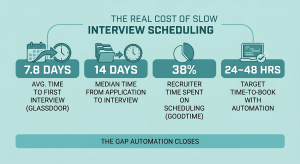
If interview scheduling feels like harmless busywork, the numbers say otherwise. Benchmarks put the average time just to schedule a first interview at 7.8 days, and median time to interview at about 14 days. That’s not just an inconvenience. It’s a full extra week where a qualified candidate is still “in limbo,” and the vacancy leaks output like a cracked bucket.
It also drives candidate drop-off, and you get stuck in email hell. Multiple candidate experience surveys consistently show that slow hiring processes are one of the top reasons qualified candidates withdraw — and a long scheduling thread is often the first sign that the process is too slow. If you want to see this tax in your own business, track two things for the next 10 candidates: days from “let’s interview” to “calendar invite sent” and how many touchpoints it takes to land a time.
Consistent time-to-invite and touchpoint tracking is one of the fastest ways for a CEO to spot where candidates are falling out of the funnel. Read more in our article: Track Hiring Funnel Metrics
What ‘Good’ Looks Like in Practice
In a lot of SMBs, “good scheduling” gets defined as “we got something on the calendar.” That bar is too low, and Harvard Business Review has been saying speed wins for years.
A practical target is simple: once you decide you want to talk to someone, they should be able to share availability and get booked within 24–48 hours in a healthy AI interview scheduling process. Some teams that automate the availability request step report hitting that 48-hour window consistently. Against a 7.8-day average to schedule a first interview, that gap is pure self-inflicted delay.
| Operator metric | What to measure |
|---|---|
| Time to first invite | Hours from “let’s interview” to a calendar invite sent |
| Touchpoints | How many emails/texts/DMs it took to land a time |
| Reschedule drag | Whether a reschedule feels like a quick swap or a full restart |
| Show-rate protection | Whether candidates get clear confirmations and reminders (so fewer no-shows) |
If your “good” week includes multiple threads like “Does Tuesday at 2 work instead?” you don’t have a candidate problem. You have a coordination speed problem.
Where Interview Scheduling Breaks

On Tuesday, a candidate replies with three good windows in 15 minutes. By Thursday, a panel reshuffle and one missed handoff later, you are back to square one and the candidate is already halfway out the door.
Scheduling usually fails even when everyone’s trying. It breaks because one simple request (“let’s talk”) turns into playing calendar Tetris without an availability matching algorithm. Each handoff adds delay and ambiguity. By the time you’re coordinating three calendars, you’re negotiating.
The most common failure points look like this in real life:
- Handoffs: You say “yes, let’s interview,” then it bounces from you to a manager to an assistant to the candidate. Case in point: the candidate replies in 20 minutes, but the next internal response doesn’t happen until tomorrow, so you lose a full day without anyone “dropping the ball.”
- Time zones and workday mismatches: A 3 p.m. slot for you is a 6 p.m. slot for them, and suddenly every option is either too early or too late.
- Multi-person constraints: Panels and second-rounds are where good candidates go to die. You don’t need one open slot, you need the same open slot across 2–4 people, and one calendar change forces a restart.
- Stale or “optimistic” calendars: Blocks don’t get updated, travel time isn’t accounted for, or someone’s calendar shows free time that’s not actually usable.
- No-shows and weak confirmations: If the candidate isn’t 100% sure it’s locked in (or doesn’t get a reminder), your show rate suffers, and you burn another week rescheduling.
The rethink here: the bottleneck usually isn’t the candidate picking a time. It’s your internal coordination. If you want to fix this fast, look back at your last few misses and ask: which one of the five issues above showed up first? That’s the constraint to remove before you touch anything else.
Panel and multi-round interviews tend to break down without a defined sequence and clear ownership for each step. Read more in our article: Talent Acquisition Flowchart
Interview Scheduling Software, Not Just Calendar Links

You send a link, they pick a slot, and it works until the second round needs three calendars and a time zone. At that point, the thread comes back, and you’re managing more variables instead of less.
A booking link mainly lets candidates pick from what your calendar shows as open. That’s useful, but it’s not what’s killing you when you’re juggling a hiring manager, a panel, time zones, and the inevitable “can we move this?” If you buy a link expecting it to fix that mess, you’re kidding yourself.
Real interview scheduling automation is about removing the coordination labor with an automated rescheduling workflow, not just publishing availability. For instance, when you’re trying to line up a second-round with three interviewers, automation looks like a single flow that collects workable options, matches them to real interviewer windows, sends the right invites and confirmations, and makes rescheduling a quick swap instead of a restart.
A quick gut-check: are you trying to automate a slot selection, or a handoff-heavy workflow? If it’s the second one, judge solutions by whether they reduce touchpoints, protect show rates, and keep panels from turning into a week-long negotiation.
A CEO’s Buying Checklist for Interview Scheduling Automation
Recruiters spend as much as 38% of their time scheduling interviews, according to a GoodTime hiring insights report cited by HR Dive. If a tool does not collapse that coordination load, you are paying to rearrange the same friction, not remove it.
If “has a booking link” is your filter, you’ll still end up stuck chasing confirmations after the first attempt to land a time. You want something that turns “yes” into a confirmed meeting quickly and consistently. Think outcomes first: fewer touchpoints, faster time-to-invite, fewer reschedules that turn into restarts, and fewer no-shows.
| Checklist area | What to ask |
|---|---|
| Speed (time-to-book) | Can you consistently go from interview request to confirmed invite in 24–48 hours, including second-rounds? Ask what their typical turnaround looks like when the candidate doesn’t pick the first offered time. |
| Reliability (fewer mistakes) | Does it prevent double-booking and handle time zones correctly without someone manually fixing invites at the last minute? |
| Candidate Experience (low friction) | Can candidates respond in the way humans actually respond (suggest a few windows, ask a question, request a change) without falling into an email maze? |
| Manager Friction (less internal chasing) | Will your hiring managers actually use it, or will it create new “quick question” pings? To illustrate this, look for whether it can do the annoying parts automatically: nudging interviewers for availability and sending clean confirmations. |
| Edge Cases (reschedules and panels) | When someone cancels same-day, does it become a simple swap with the context preserved, or does your team start over and rebuild the whole thread? |
Rollout Without Breaking Your Process
The fastest way to kill adoption is to roll out something that makes managers feel like scheduling got harder, not easier. A small pilot gives you proof and a clean fallback before you touch the rest of the process.
You don’t need to rebuild your whole hiring stack (or add an ATS interview scheduling integration) to stop the calendar chaos. Start by automating the first interview because it’s high-volume and where speed matters most. For instance, if you’re hiring for sales or customer support, that first conversation happens over and over each week, and every extra email thread multiplies.
Set a few rules so it doesn’t create internal pushback: who owns scheduling, what counts as “available,” and how quickly your team needs to respond. Then run a two-week pilot on one role and measure it like EOS insists, not a vibe.
Use an automated reminder system and track four things.
Automated reminders are one of the simplest levers to reduce no-shows without adding manual follow-ups for your team. Read more in our article: Automated Sms And Calendar Reminders Measure time-to-invite and touchpoints. If those don’t move, you didn’t automate scheduling, you just changed the way you send emails.
FAQ
Is Interview Scheduling Automation Worth It, or Is This Just Admin?
If your team spends even minutes per invite, it is death by paper cuts, especially when back-and-forth ping-pong turns reschedules into restarts. The bigger cost is the candidates you lose while you’re “still trying to find a time.”
Will Candidates Think Automation Feels Cold or Impersonal?
They don’t mind automation, they mind friction. If it gets them booked quickly, confirms clearly, and makes rescheduling painless, it usually feels more professional than a three-day email thread.
How Does This Work With Time Zones, Panels, and Second Rounds?
That’s where basic booking links fall apart and real automation pays off: it needs to collect workable windows and match them across multiple calendars. If a reschedule still requires five people to reply-all, you didn’t actually fix the problem.
We’re “Too Small” for This, Right?
If you’re hiring continuously, you’re big enough to feel the drag. Even automating only first-round interviews can remove a ton of back-and-forth without changing the rest of your process.
What About Privacy and Sharing Calendars?
You don’t need to expose your whole calendar to reduce scheduling chaos; you need controlled availability and clean confirmations.
Conclusion
Every week a position stays open costs money — in lost output, in team coverage gaps, in the mental load of managing a short-staffed operation. The scheduling thread that takes three days instead of three hours isn’t just annoying. It’s part of the reason that position is still open.
The good news: this is one of the faster things to fix. Scheduling automation doesn’t require a new stack or a big implementation project. It requires the right tools and about 20 minutes of setup.
See what Discovered’s scheduling tools can do for your team: Interview Scheduling Links → Or, if you’d rather walk through it with someone, book a demo here and we’ll show you how it fits your workflow.
Content