




Interview Scheduling Built Into Your Hiring Workflow
Manage availability, create scheduling links, automate reminders, and keep every interview organized inside Discovered.

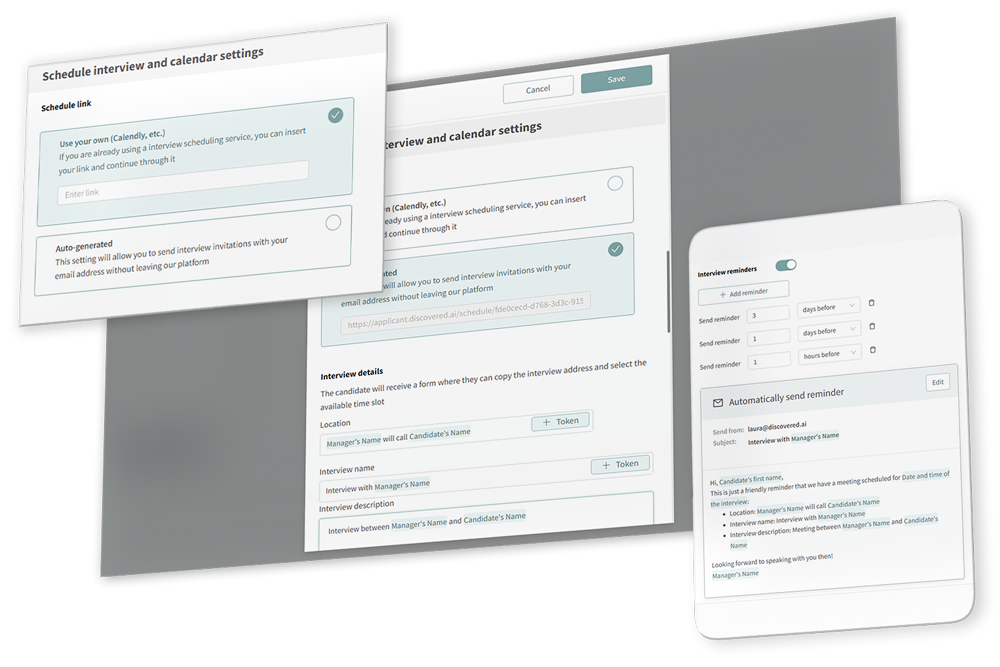
Scheduling should not slow down your hiring process
Back-and-forth emails, calendar conflicts, missed reminders, and manual interview tracking create friction for candidates and hiring teams.

Discovered’s Scheduling Settings make it easier to manage interview availability, scheduling links, reminders, calendar integrations, and candidate scheduling experiences from one centralized place. The feature is designed to reduce scheduling back-and-forth while keeping interviews organized and automatically tracked in candidate profiles.
Interview Scheduling, Built Into Discovered

Manage Availability in One Place
Set interview buffers, time zones, earliest scheduling notice, booking windows, and availability by day—so candidates only book when your team is actually available.

Create Links for Every Interview Type
Use a default scheduling link or create separate links for phone screens, video interviews, group interviews, or in-person meetings. You can also duplicate links, copy raw links, and manage team access.

Keep Interviews Automatically Organized
View upcoming interviews, manage reminders, edit interview details, and keep candidate profiles updated when scheduling links are sent through Discovered tokens.

From availability to confirmed interview, without the back-and-forth.

Connect your calendar
Before managing scheduling options, users may be prompted to connect Google or Microsoft calendar tools. Once connected, they can configure scheduling settings inside their profile.

Set general availability
Define your default scheduling preferences, including interview buffer, time zone, earliest scheduling notice, maximum scheduling window, and availability windows by day.
Create or manage scheduling links
Create multiple scheduling links for different interview types, use an auto-generated default link, duplicate existing links, copy raw links, or choose whether teammates can access and share your links.

Manage upcoming interviews
Use Manage Interviews to view upcoming interviews, filter by My Interviews or Team Interviews, cancel interviews, edit details, and view or edit upcoming reminders. If an interview is rescheduled, reminders automatically adjust.

Track call outcomes
After calls, PhoneBurner can capture dispositions such as appointment or follow-up, and call activity is logged in the candidate profile, including call times, details, outcomes, and recordings when available.
Manage upcoming interviews
Use Manage Interviews to view upcoming interviews, filter by My Interviews or Team Interviews, cancel interviews, edit details, and view or edit upcoming reminders. If an interview is rescheduled, reminders automatically adjust.
Learn more about our tools
"*" indicates required fields
Less manual scheduling. Better interview visibility.
Discovered’s scheduling tools help teams reduce manual scheduling work, keep candidate interviews automatically tracked, support one-on-one and group interview workflows, improve reminder consistency, and better manage scheduling access across teams and admins.
Benefits

Reduce manual scheduling work
-
Support one-on-one and group interviews
-
Improve reminder consistency
-
Keep interview details tracked in Discovered
-
Give teams better visibility into upcoming interviews
-
Help admins support scheduling access and setup


Built for recruiters, hiring managers, high-volume teams, and admins

Recruiters
Send scheduling links directly to candidates and reduce back-and-forth.

Hiring Managers
Manage availability, reminders, and interview details in one place.
Hiring Managers
Manage availability, reminders, and interview details in one place.

Admins
Help users configure scheduling settings when access is granted.
Ready to make interview scheduling easier?
Manage availability, share interview links, automate reminders, and keep every candidate interview organized inside Discovered.