




Collaboration Tools Keep Your Hiring Team And Candidates Engaged
Seamless collaboration. Consistent candidate journeys
Discovered’s collaboration tools keep hiring teams aligned with shared emails, SMS, assessments, and referrals workflows—so everyone works smoothly while candidates enjoy a consistent experience.


What Are Hiring Collaboration Tools?
Hiring Collaboration Tools are built to help teams coordinate every part of the recruitment process—without stepping on each other’s toes or confusing candidates.

Discovered’s Collaboration Tools make it easy for recruiters, hiring managers, and HR to work as one. From shared emails and texts to co-editable assessments and referral campaigns, everything is designed for smooth teamwork and a unified candidate experience.
For example...

Instead of candidates receiving messages from different team members with different phone numbers, Discovered lets your whole team send emails and texts from a single, consistent identity.
Everyone stays on the same page—and candidates get a seamless, professional experience from first touch to final offer.
Why Use Collaboration Tools?

One Voice, One Experience
Discovered lets your whole team send emails and texts from a single company address or phone number. This keeps candidate communication consistent—no confusion from messages coming from different team members.

Work Together, Not in Silos
Whether you're creating assessments, tracking referrals, or managing candidate pipelines, your team can collaborate on every step of the process in a shared workspace.

Scale Without Losing Control
Hiring in volume? Discovered’s collaboration tools ensure your workflows stay organized and your candidate experience stays polished—even when multiple people are involved.
How Collaboration Tools Work

Use One Email Address for Every Candidate
When multiple users manage a job, candidates can get confused by emails from different names. Discovered solves this by letting you turn on a “Use One Email” setting—so every email appears to come from your company address, no matter who hits send.
Send SMS from a Shared Phone Number
Enable the “Use One Phone Number” option to make sure text messages always come from the same source. This builds trust with candidates and prevents confusion from multiple unknown numbers.

Customize Assessments Together
Your team can build assessments using Kingsley AI or manual creation tools. Add sections, edit questions, and assign them to jobs—no need to switch between tools.

Run Referral Campaigns
Leverage employee networks with our built-in referral tools. Launch referral campaigns, send automated reminders to employees, and track performance—all from one place.
Learn more about our tools
Features Form - Category: Communication & Collaboration (DAI)
"*" indicates required fields
Key Features
Unified Email Identity
Ensure emails come from one designated address, no matter who sends them.
Shared Phone Number for SMS
Keep text messaging consistent with a single job-specific number.
Team-Editable Assessments
Let recruiters and hiring managers build, edit, and assign assessments collaboratively.
Employee Referral Campaigns
Run automated referral programs with tracking and engagement tools.

Centralized Activity Views
See which team members sent messages, updated statuses, or added notes—right on the candidate timeline.
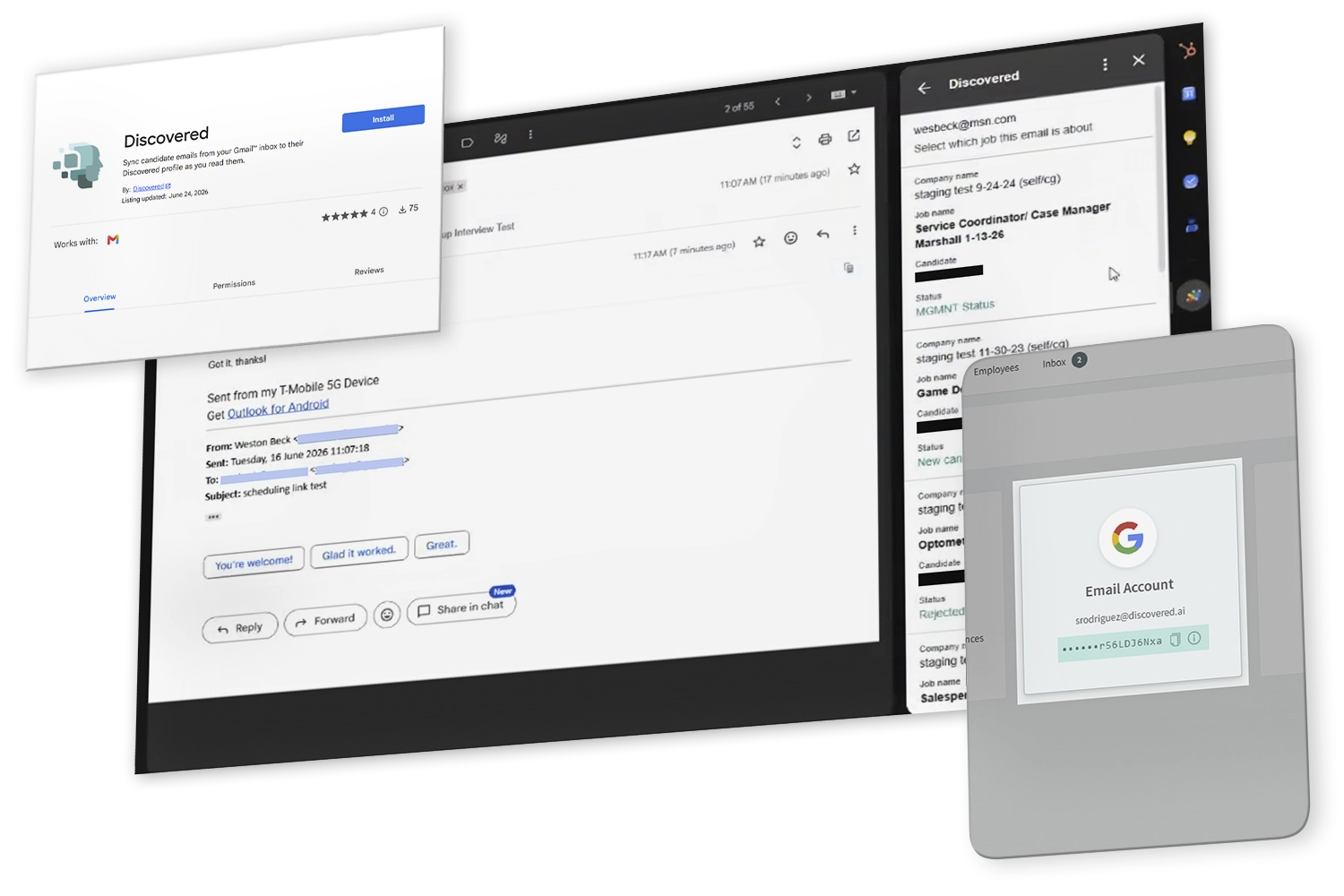
Keep Hiring Collaboration Complete With the Discovered Gmail Add-On
Your team works from one shared candidate record.
When a candidate answers in someone's own inbox, Discovered Gmail Add-On lsends that message to their profile.

Open the email, confirm the candidate, and sync it.
-
Recruiters, hiring managers, and HR see the same exchange.
-
Nobody has to forward a thread or ask what the candidate said.

Perfect For…
-
Hiring teams managing the same job collaboratively
-
Companies that care about a unified candidate experience
-
Recruiters looking to streamline internal workflows
-
Growing teams that need better coordination at scale



Hear From Our Customers

Pro Tip
“Discovered’s collaboration tools don’t just help your team—they protect your candidate experience. When everything’s consistent, professional, and trackable, hiring gets easier.”
— Fletcher Wimbush, CEO

Ready to Make Hiring a Team Sport?
Streamline team communication, eliminate candidate confusion, and collaborate like a pro with Discovered’s hiring tools.