




Offer Letters for Employers, Built Into Your Hiring Workflow
Send, sign, and track offer letters without leaving Discovered.
Build the offer letter once, attach it to a candidate status, and let Discovered send it, collect the signature, and record every step.

What Are Offer Letters in Discovered?
Offer letters for employers in Discovered is a signable employment offer that lives inside your applicant tracking system.
It comes from a reusable template, sends automatically when a candidate reaches your offer stage, and stays on the candidate profile until it is signed.

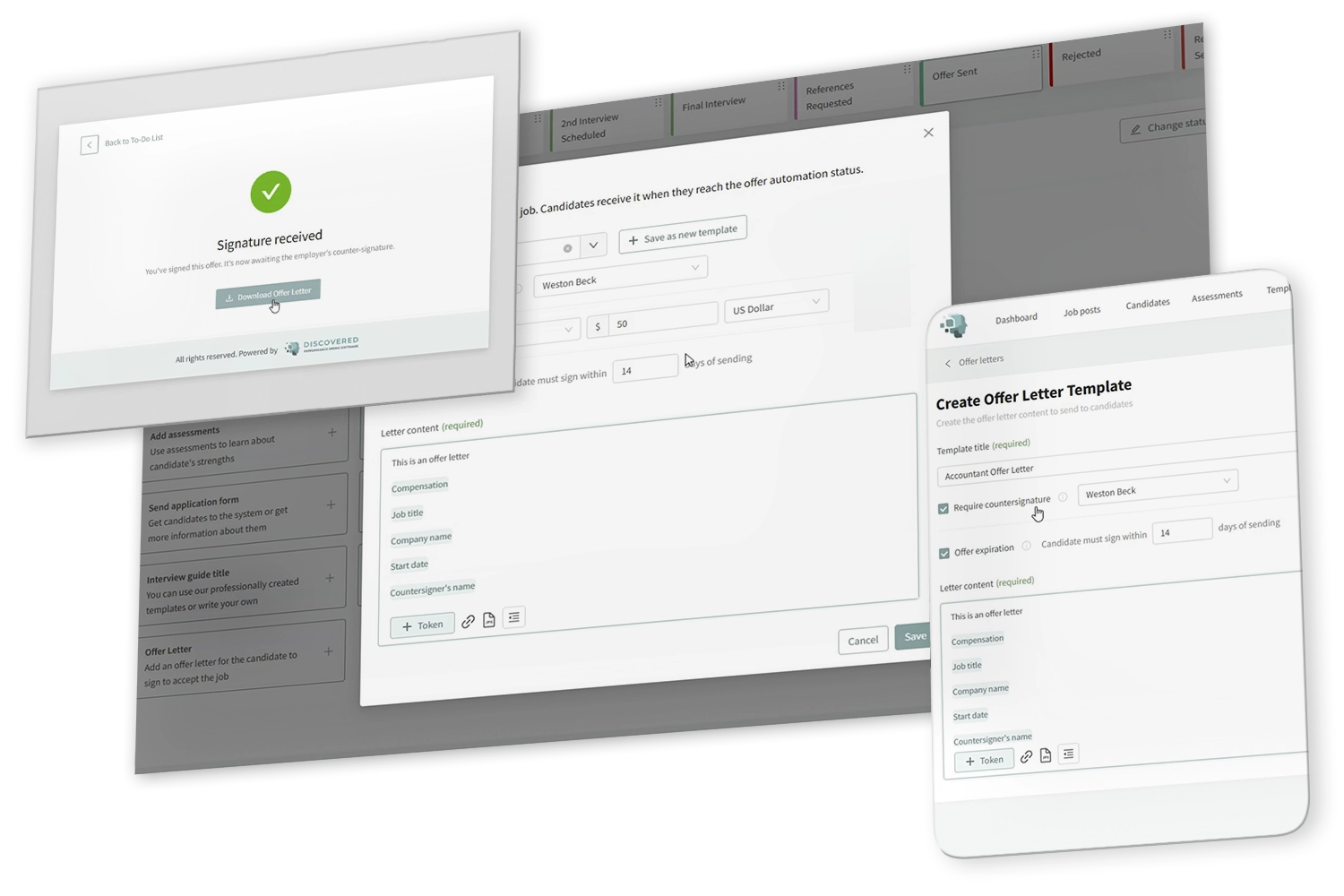
With Discovered’s offer letters, the final stage of hiring stops living in email threads and shared drives. Your team writes the letter once, tokens fill in the details for each candidate, and the offer goes out the moment that candidate is ready for it.

The candidate signs from a link in their browser.
Every offer stays attached to the candidate record, so anyone on the team can see where it stands.
Why Send Offer Letters From Your ATS?

Close Faster at the Moment That Matters
The offer stage is where good candidates go cold. An offer that arrives the same hour, signable in one click, is an offer that gets accepted.

Stop Rewriting the Same Letter
Reusable templates mean the numbers change and the language does not. Consistent offers, fewer mistakes, less legal exposure.

Never Ask Around Again
Whether a candidate has signed is a question your team should not have to ask. The answer sits on the candidate profile, with the full history behind it.

How Offer Letters Automation Works

Build the Template
Go to Templates, open Offer Letters, and create one per role or offer type. Give it a name your team will recognize, then write the letter content.

Add the Tokens
Drop in the fields that change from one offer to the next, so the same template works for every candidate who receives it.

Set the Signing Rules
Decide whether the offer needs a countersignature from your side and whether it should expire. Both are optional, and both are set per template.

Attach It to a Job Status
In the job workflow, add the Offer Letter automation to a candidate status. Choose the template you already built, or write one from scratch for this job alone.

Add the Offer Letter Link to the Message
The status message is what the candidate actually receives, so include the Offer Letter Link token in it. Without that link, the letter is created but the candidate has no way to reach it.

Move the Candidate and the Offer Sends
The moment a candidate enters that status, the letter is generated and the message goes out. They sign from the link, your countersigner is notified if you assigned one, and the status updates on its own.
Learn more about our tools
Features Form - Category: Onboarding & Employee Development (DAI)
"*" indicates required fields
Key Features
Offer Letter Templates for Employers
Create one template per role or offer type and reuse it across every job.

Status-Based Sending
Attach the offer to any candidate status in your hiring workflow, and it triggers when you move the candidate.
Candidates E-Sign in the Browser
The candidate opens a link, reviews the offer, types their name and signs. No account, no app, no printer.
Optional Countersignature
Turn it on only if your company signs too. Assign a countersigner from your team and they are notified once the candidate signs.

Optional Expiration Window
Set a deadline of 14 days, 7 days, or whatever your process needs. Or skip it and leave the offer open until the candidate responds.
Perfect For…

Hiring managers who want offers out the same day
-
Teams paying for a separate e-signature tool they barely use
-
Companies that need a countersignature on every offer
-
SMBs hiring for repeatable roles at volume


FAQ's
Attach the Offer Letter automation to a candidate status, and include the Offer Letter Link token in the status message. Moving the candidate into that status generates the letter and sends it.

Pro Tip
“The gap between a verbal yes and a signed offer is where you lose people. Close it to hours and your acceptance rate takes care of itself.”
— Fletcher Wimbush, CEO

Ready to Get Offers Signed the Same Day?
Build your offer letter templates once, attach them to your hiring workflow, and let every offer send, sign and track itself.