


Tailored Application Forms That Work for You
Control the Candidate Experience From First Click
Discovered gives you total control over how applicants apply. Whether you need a simple one-page form or a detailed, multi-step process, our customizable application forms help you gather the right info, without the back-and-forth.

What Is Customizable Application Forms in Hiring?
Customizable application forms let you design the candidate experience from the very first click—tailoring how applicants apply, what information they provide, and how the process feels at every step.

Instead of relying on one-size-fits-all forms, you can build layouts that fit the role.
-
Need something short and mobile-friendly? Go for a simple one-pager.
-
Hiring for a high-skill or regulated role? Create a multi-step form that collects documents, credentials, and screening answers.

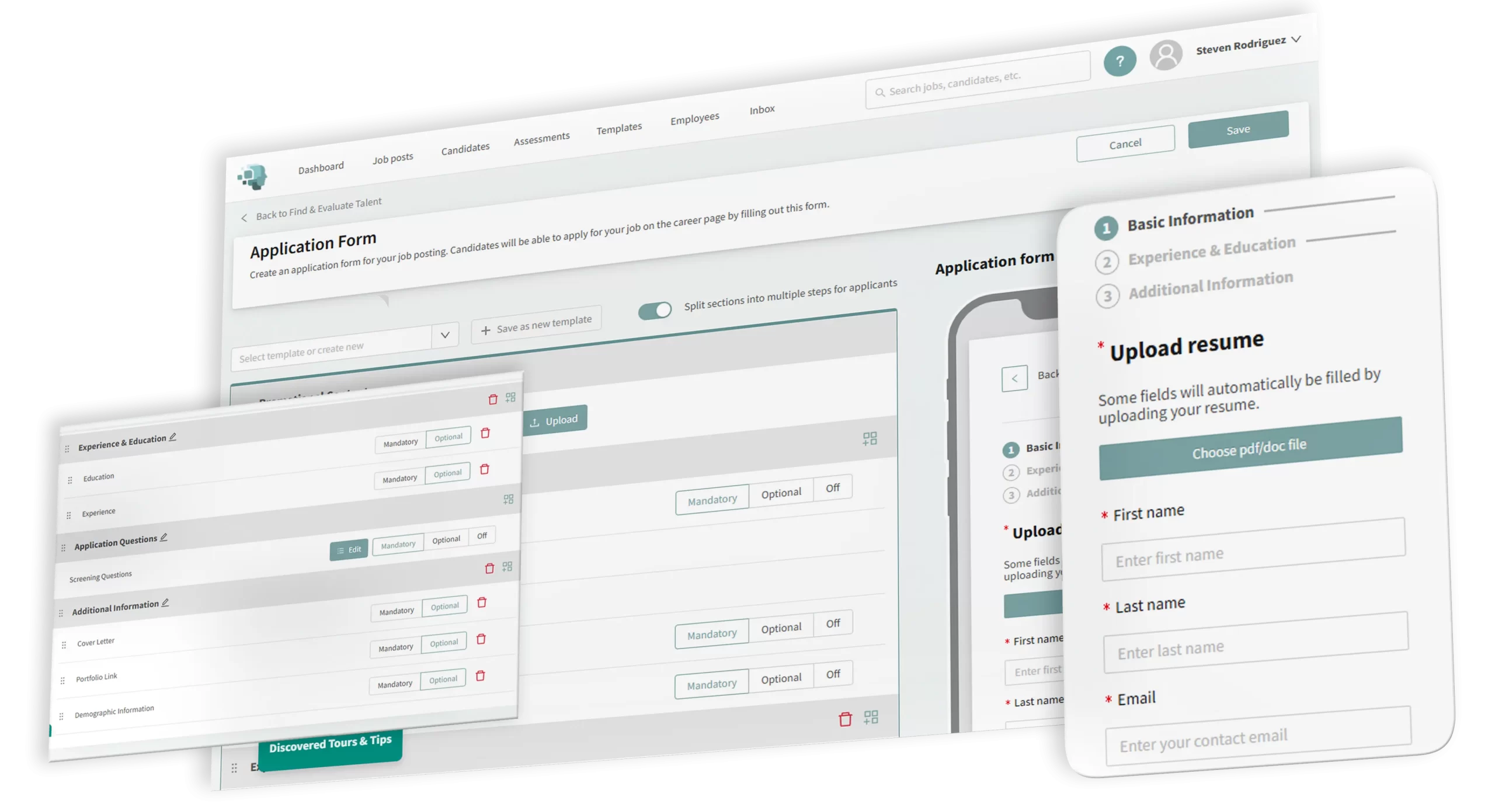
With Discovered’s drag-and-drop builder, you control everything.
-
Add custom fields like salary expectations, availability, or certifications.
-
Break up the form into sections like Education, Experience, or Role-Specific Questions.
-
Mark fields as required or optional based on your hiring goals.

You can even save forms as templates, push updates across all live jobs, or reuse layouts for similar roles.
Whether you’re hiring across multiple departments or fine-tuning for a niche position, customizable application forms help you stay consistent, efficient, and aligned—while making it easier for the right candidates to apply.
Why Use Customizable Application Forms?

Ask What Matters Most
Add custom questions, request uploads, or gather optional details like salary expectations—no cookie-cutter forms here.

Streamline for Candidates
Split long forms into smaller steps to make them easier to complete, especially on mobile. Better experience = more completions.

Stay Consistent (When You Want To)
Save forms as templates and reuse across roles—or push updates to all jobs when requirements shift.

Customize for Different Roles
One size doesn’t fit all. Tailor forms by department, seniority, or geography without reinventing the wheel.
How Customizable Application Forms Work
Launch the Form Builder
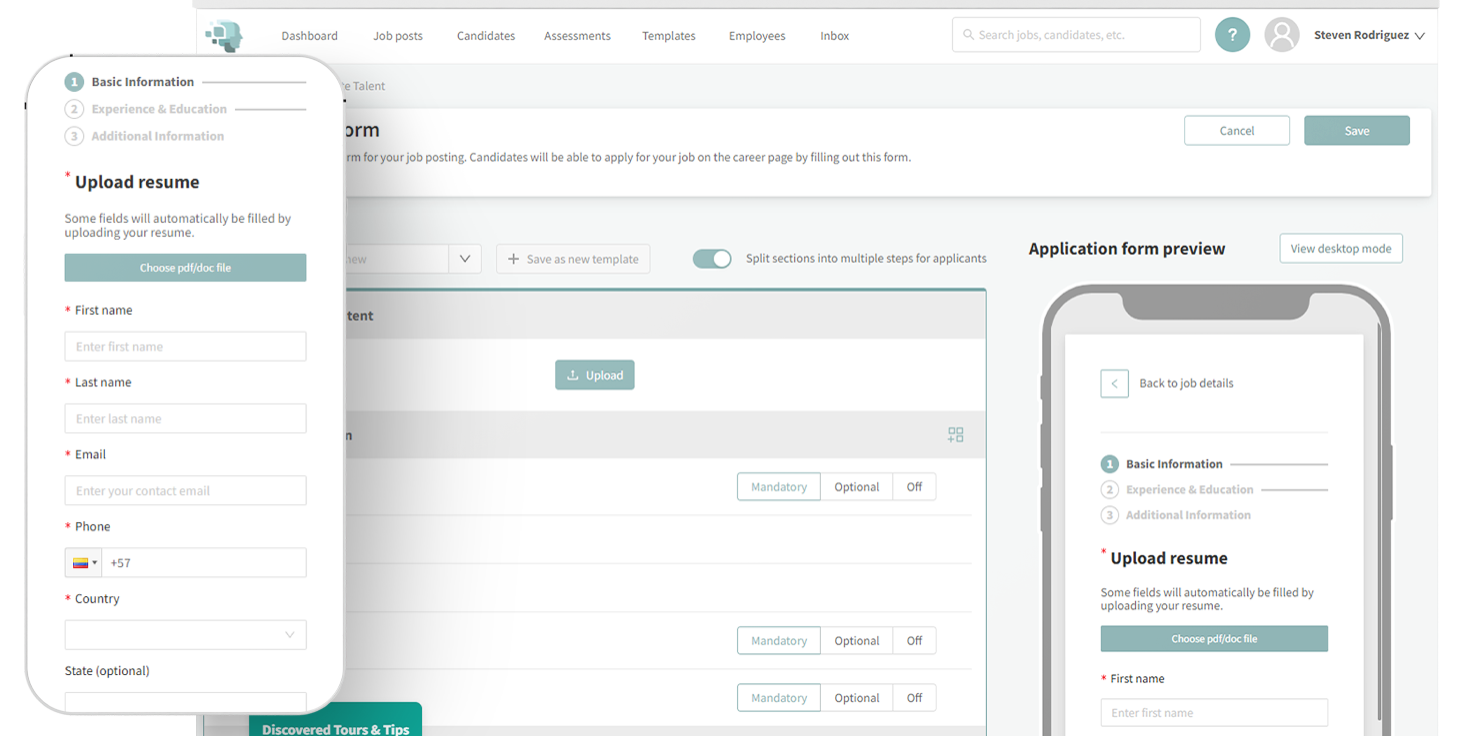
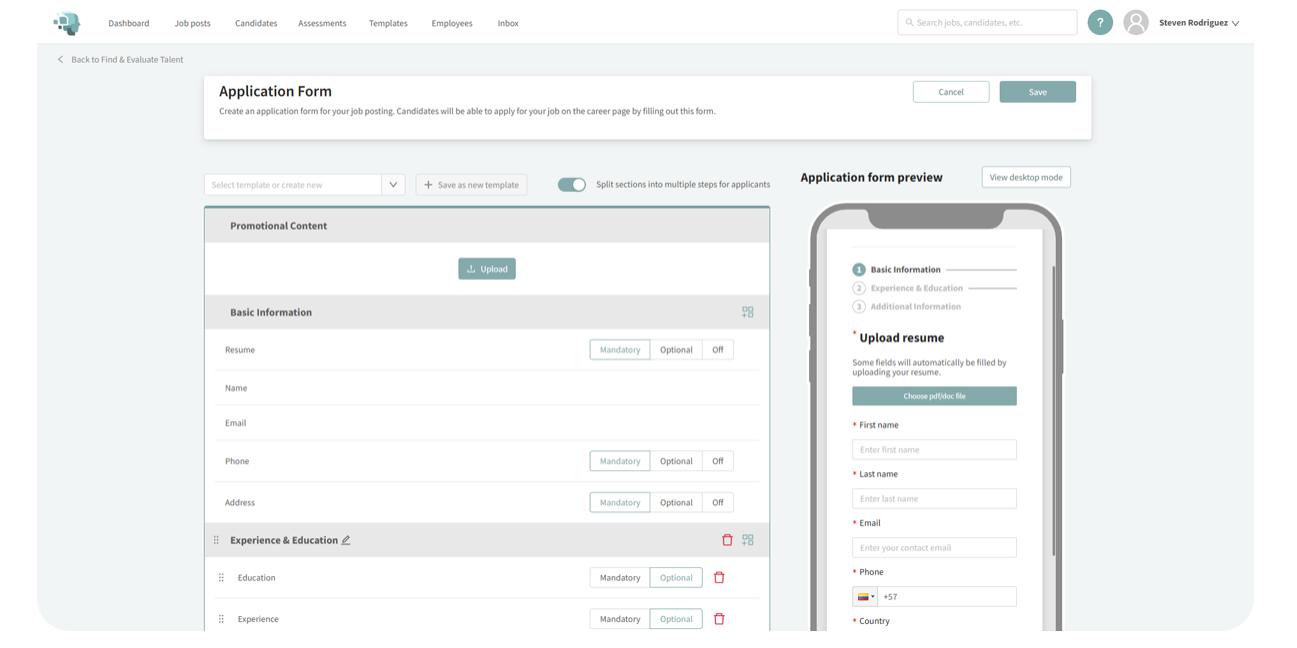
From any job, navigate to Find and Evaluate Talent and click on Application Form. You’ll enter a drag-and-drop builder with full layout control.
Structure Your Form
Choose between:
- One-page layout: everything on a single screen
- Multi-step layout: group fields into sections like Education, Experience, and Additional Questions

Add the Fields You Need
- Use boilerplate fields (Education, Experience, Cover Letter, etc.)
- Or create custom fields:
- Short text
- Long text
- Multiple or single choice
- Date
- File upload
- Short text

Create New Sections
Insert new form sections anywhere with one click. Name them based on your process—e.g., "Licenses," "Language Skills," or "Role-Specific Details."

Configure Requirements
Mark fields as required or optional. Built-in logic ensures key info like name and email are always collected

Manage Screening Questions
Mark fields as required or optional. Built-in logic ensures key info like name and email are always collected

Save as Template or Push to All Jobs
Once your form looks right, save it as a reusable template. You can also:
- Set it as the default for all new jobs
- Push it to all active jobs in one click when updates are needed
Learn more about our tools
Features Form - Category: Applicant Management & Workflow (DAI)
"*" indicates required fields
Key Features
Drag-and-Drop Form Builder
Rearrange fields, add custom sections, and organize layouts with ease
Multi-Step Navigation
Split forms into logical sections for a better applicant experience
Flexible Field Types
From text boxes to file uploads, capture what you need
Template Management
Save and reuse forms, set defaults, or duplicate with changes
Screening Question Integration
Control inclusion and response requirements for pre-configured screening questions

Field-Level Logic
Make any questions required or optional, depending on your hiring needs
Perfect For…
-
Companies hiring for roles with unique requirements
-
Recruiters who want better completion rates
-
HR teams managing hiring across multiple departments
-
Anyone who’s tired of generic forms and one-size-fits-all applications
Hear From Our Customers

Pro Tip
“The right form filters out bad fits before the first interview. It’s not just about gathering info—it’s about guiding the right people through.”
— Fletcher Wimbush, CEO
Ready to Build Forms That Fit Your Hiring Needs?
Create better applications. Save time. And guide candidates through a smoother process.