




Automate Candidate Status Based on Real Hiring Signals
Conditional Candidate Status Rules help recruiters automatically move candidates through the hiring pipeline based on actions, responses, ratings, and engagement—so your workflow adapts in real time.

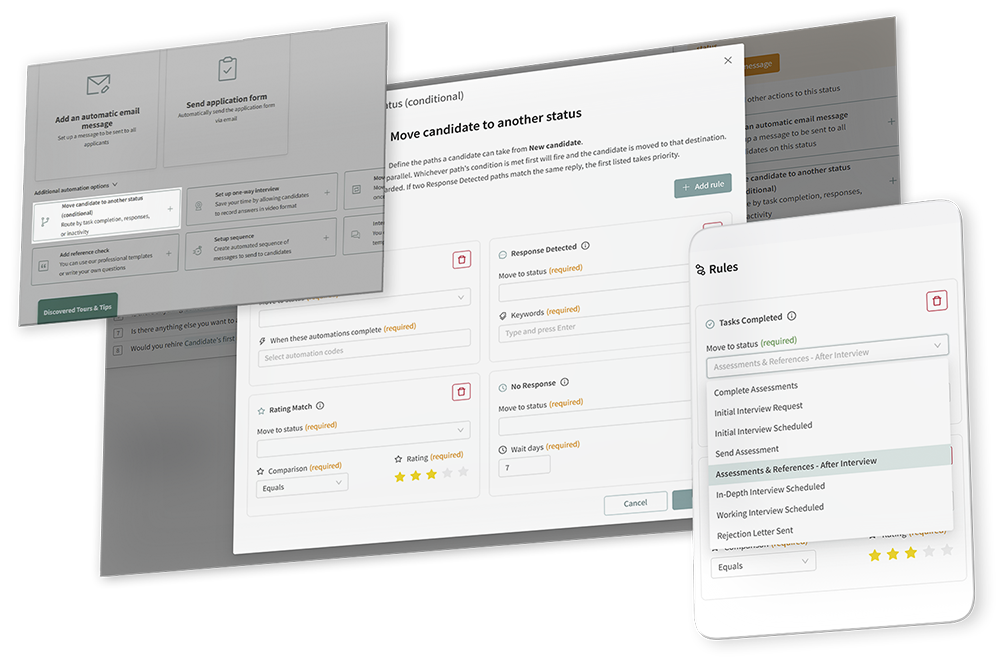
Static workflows slow down fast-moving hiring teams.
When every candidate needs to be moved manually, pipelines get messy. Strong candidates wait too long. Unresponsive candidates stay active. Recruiters spend valuable time updating statuses instead of evaluating and engaging the right people.

Discovered’s Click-to-Dial and PhoneBurner integration helps recruiters move from candidate profile to conversation in seconds. With instant calling and bulk dialing workflows, teams can reach more candidates, improve response times, and keep communication history organized.
Smarter Candidate Routing, Built Into Discovered

Move Candidates Automatically
Stop manually updating candidate statuses. Build rules that move candidates forward, sideways, or into follow-up stages based on what they actually do.

Respond to Real Candidate Behavior
Route candidates based on completed tasks, replies, star ratings, or no response—so your workflow reacts instantly to engagement and fit signals.

Keep Pipelines Clean and Focused
Automatically prioritize stronger-fit candidates, separate lower-fit applicants, and move inactive candidates out of active stages before your pipeline gets cluttered.
Candidate status automation that adapts to your hiring workflow
Unlike the original “Move Candidate to Another Status” automation—which only moved candidates after all automations on a status were completed—Conditional Status Rules let teams create customized routing logic that responds to candidate behavior in real time.
This helps hiring teams:

Reduce manual pipeline management
-
Respond faster to candidate engagement
-
Prioritize stronger-fit candidates automatically
-
Build more personalized recruiting workflows
-
Keep pipelines organized and efficient


Build smarter workflows with conditional routing logic
Build smarter workflows with conditional routing logic
Choose the workflow status
Start inside the job workflow status you want to configure, such as “New Candidate,” and add the conditional automation.

Add conditional routing rules
Select Move Candidate to Another Status (Conditional) and create one or multiple rules depending on how your hiring workflow should behave.

Pick the rule type
Choose from four rule types: completed tasks, response detected, rating match, or no response. Each rule tells Discovered when a candidate should move and where they should go next.
Set the destination Status
For each rule, select the trigger condition and choose the destination status the candidate should move to once the rule is met.
Save and let Discovered monitor activity
Once saved, the automation begins monitoring candidate activity automatically and moving candidates dynamically based on configured conditions.
Learn more about our tools
"*" indicates required fields
Automate candidate movement
based on the signals that matter
Tasks Completed
Move candidates after they complete required tasks like assessments, one-way video interviews, or interview scheduling. You can require multiple tasks together or create separate rules depending on which action happens first.
Respond to Real Candidate Behavior
Route candidates based on completed tasks, replies, star ratings, or no response—so your workflow reacts instantly to engagement and fit signals.

Rating Match
Route candidates based on star ratings assigned manually or by Kingsley AI. Higher-rated candidates can move forward faster, while lower-rated candidates can be sent to a secondary review queue.

No Response
Automatically move candidates when they have not responded within a specified period of time, helping teams avoid inactive candidates sitting in active stages indefinitely.
Less manual work. Faster decisions. Cleaner pipelines.
Conditional Candidate Status Rules make recruiting workflows more intelligent and scalable. They help teams react faster to candidate engagement, automate repetitive status updates, and keep hiring pipelines organized as volume increases.
Benefits
-
Eliminate repetitive manual status updates
-
React instantly to candidate engagement
-
Prioritize high-quality candidates automatically
-
Create personalized workflows at scale
-
Reduce pipeline clutter and inactive candidates
-
Help recruiters focus more time on top talent

Built for recruiting teams that need workflows to move faster

Recruiters
Automatically move engaged candidates forward when they respond to outreach or complete assessments.

Hiring Teams
Prioritize stronger-fit candidates based on Kingsley AI ratings or recruiter scoring.
High Volume Hiring
Route inactive candidates into follow-up or archive stages to keep pipelines organized.

Recruiting Operations
Build advanced workflows that respond differently depending on which candidate action happens first.

AI-Assisted Recruiting
Use Kingsley-generated star ratings to automate candidate sorting and prioritization.
Ready to make your hiring pipeline move smarter?
Use Conditional Candidate Status Rules to automate decision-making, prioritize the right candidates,
and keep your pipeline cleaner—without adding more manual work.