



A candidate can interact with several parts of your hiring process before speaking with a hiring manager. They may discover a job on a job board, complete an online application, exchange emails with a recruiter, choose an interview time from a scheduling link, complete an assessment, and eventually receive an offer. Each of those steps can work perfectly on its own while the overall hiring process remains disconnected.
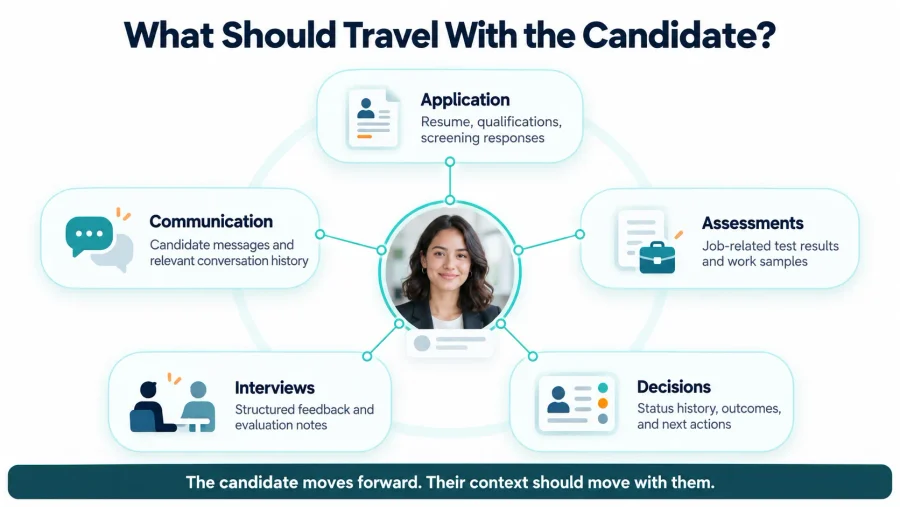
The application contains information the interviewer never sees. A candidate tells the recruiter something important by email, but the hiring manager has no access to the conversation. Interview feedback stays in someone’s notes. An assessment is completed, but nobody notices until the following day. The candidate continues moving, while their context stays behind.
A recruiting workflow solves that problem by connecting stages, responsibilities, information, and decisions into one process. The purpose is not simply to move candidates through statuses faster. It is to make sure everyone involved understands what has already happened, what evidence exists, what should happen next, and who owns that next action.
That distinction matters because a hiring workflow can look organized in an ATS and still fail operationally. The real test is whether candidate information remains useful as the person moves from one stage and one team member to another.
A Recruiting Workflow Is More Than a List of Hiring Stages
Most hiring teams already have some version of a recruiting process. A candidate applies, receives an initial review, completes interviews, moves through additional evaluation, and eventually reaches an offer or rejection.
Simply naming those stages does not create a strong workflow.
A useful workflow defines what each stage means, what information should exist before a candidate enters it, who is responsible while the candidate is there, and what condition determines whether the person moves forward.
Indeed’s current guide to the recruitment process describes hiring as a connected progression from defining the need and attracting candidates through screening, interviewing, offering, and onboarding. That structure becomes more useful when organizations add clear ownership and information requirements to each transition.
A simplified workflow might look like this:
| Stage | What should be known | Primary owner | What moves the candidate forward |
|---|---|---|---|
| Application Review | Application, resume, required qualifications | Recruiter | Initial requirements are met |
| Screening | Availability, expectations, basic fit | Recruiter | Screening criteria are satisfied |
| Assessment | Job-related skill or evaluation evidence | Recruiter / Hiring Manager | Required assessment is completed and reviewed |
| Interview | Structured candidate evidence and prior context | Hiring Manager | Feedback supports further consideration |
| Final Review | Complete hiring evidence | Hiring Team | Decision is approved |
| Offer | Approved candidate and employment terms | Recruiter / HR | Candidate accepts or declines |
| Onboarding Handoff | Signed offer and relevant hiring information | HR / Operations | New-hire process begins |
What makes the workflow useful is not the labels in the first column. It is everything that connects them.
Start With One Reliable Candidate Record

A connected hiring process needs one place where the team can reconstruct what has happened with a candidate.
Recruiters may still communicate through email, text, phone calls, interview platforms, or external tools, but important information should not remain permanently scattered across those channels. If a recruiter goes on vacation or a hiring manager takes over the next stage, another authorized person should be able to understand the candidate without rebuilding the history from individual inboxes and personal notes.
The Candidate Profile in Discovered brings information such as application details, resumes, communications, internal notes, assessments, interview resources, references, and job-specific scorecards into the candidate record. That centralization is important because every later hiring decision depends on the quality and accessibility of the context collected earlier.
Application design is part of that foundation. As we explain in our guide to job application form best practices, the first application should collect information that actually helps the team determine the next step rather than creating unnecessary candidate effort. When that information flows directly into the candidate record, recruiters can use it throughout the process instead of repeatedly asking for the same details.
The same principle applies to communication. Candidate information becomes far less valuable when it lives only in one recruiter’s memory. Notes should preserve useful factual context, while routine communication should remain visible enough that another person can understand what the candidate has already been told.
A single source of truth does not mean every interaction needs to be documented in exhaustive detail. It means that information capable of affecting a future hiring decision should not disappear when responsibility changes hands.
Design Candidate Stages Around Decisions, Not Activity
Hiring pipelines often become crowded because statuses are created every time the team performs an activity. A candidate may move from New to Contacted, then Email Sent, Phone Screen Requested, Phone Screen Scheduled, Phone Screen Complete, Manager Review, Interview Requested, and Interview Scheduled. The workflow looks detailed, but the statuses may be describing recruiter activity rather than meaningful changes in the candidate’s evaluation.
A cleaner workflow uses stages to answer a more useful question: what is different about the candidate now than it was before?
After an application review, the organization knows whether the candidate meets the initial requirements. After a screening conversation, the team knows more about availability, expectations, and basic fit. After an assessment, there is new evidence about a job-related capability. After an interview, there should be structured information that supports a later hiring decision.
When stages represent meaningful changes in information or decision state, the pipeline becomes easier to understand. Recruiters can see why someone is waiting, managers can identify what work is still required, and reporting becomes more meaningful because candidates in the same stage are actually there for similar reasons.
Clear stage definitions also reduce inconsistent behavior between recruiters. If Interview Review means one thing to one recruiter and something different to another, automation and reporting built around that status will eventually produce confusing results. The workflow should therefore define not only the name of a stage, but the conditions for entering and leaving it.
Connect the Candidate Experience Between Stages
Recruiters experience hiring as a series of internal tasks. Candidates experience it as one continuous relationship with the employer. That difference is easy to overlook. From the candidate’s perspective, it does not matter that the application is managed by one system, scheduling by another tool, interviews by a manager, and assessments by a different team. They see one company.
Indeed’s candidate journey guidance describes recruiting as a series of interconnected touchpoints extending from job discovery through application, selection, hiring, and onboarding. Mapping those touchpoints can expose delays, confusing transitions, and places where candidates disengage.
A strong recruiting workflow should therefore make the handoff between stages understandable to the candidate.
After applying, they should know whether anything else is required. After screening, the next action should be clear. When an interview is scheduled, confirmation and preparation information should arrive without unnecessary email exchanges. After completing an assessment, candidates should not continue receiving reminders asking them to complete it. This is where workflow design and candidate experience become the same problem.
Our article on the recruitment marketing funnel looks at the journey before application, when candidates are deciding whether the opportunity deserves their attention. The recruiting workflow continues that same experience after Apply. If the candidate moves from a clear, polished recruiting experience into delayed communication and disconnected hiring stages, the transition becomes noticeable.
Indeed similarly notes that candidate experience is shaped by interactions throughout the hiring process, including application, interviews, offers, and onboarding rather than by one individual touchpoint.
Consistency therefore matters both internally and externally. The team should know what comes next, and the candidate should not need to guess.
Assessments and Interviews Should Add Different Evidence
A connected recruiting workflow becomes stronger when each evaluation stage has a defined purpose. Problems appear when the same questions are asked repeatedly. The recruiter asks about the candidate’s background during screening, the hiring manager repeats the same questions during the first interview, and a second interviewer spends another thirty minutes covering information already available in the resume.
That repetition uses time without necessarily improving the decision. Instead, each stage should add evidence that the team does not already have. An application may establish baseline qualifications and experience. A screening conversation can clarify expectations and availability. A job-specific exercise can demonstrate whether the candidate can perform an important task. An interview can explore judgment, decisions, collaboration, or examples from previous experience.
This is why Custom Skill Tests in Discovered can fit into a broader workflow when the team needs evidence that is difficult to obtain from a resume alone. The assessment should answer a specific hiring question rather than exist simply because the workflow has an Assessment stage.
Interviewers should then enter the conversation knowing what has already been established. They can focus on unresolved questions instead of making the candidate retell the entire process.
Structured feedback becomes particularly important at this point. If one interviewer evaluates technical ability while another focuses primarily on personality without any shared criteria, the workflow may successfully collect information but still leave the final decision difficult to compare. The objective is not to make every interview identical. It is to ensure that the evidence produced at each stage can be understood by the people responsible for the next one.
Automate the Handoffs That Do Not Need New Judgment
Once the workflow is clear, many transitions no longer need to depend on recruiters remembering routine administrative tasks. A candidate completes an assessment, and the status can move into review. An interview is scheduled, and the confirmation can be sent. A required activity remains incomplete, and a reminder can follow after an appropriate period. A candidate reaches an approved offer stage, and the correct document can be prepared.
The administrative event is predictable even when the hiring decision is not. Our guide to recruitment automation best practices makes this distinction central: predictable and rules-based actions are generally better automation targets than decisions requiring interpretation, empathy, or context.
Discovered’s automated candidate stage movement illustrates how candidate actions such as completing an assessment or video submission can trigger movement through the workflow without requiring recruiters to perform every status change manually.
The same logic applies later in the process. When a hiring decision has already been approved, offer letters can be connected directly to a job workflow so that reaching the appropriate status generates the document and candidate message rather than beginning another disconnected manual process.
Automation should therefore strengthen the handoff between stages, not determine every outcome within them. A useful recruiting workflow keeps humans responsible for evaluating evidence and handling exceptions while technology handles the repetitive movement of tasks, information, reminders, and communication around those decisions.
Ownership Matters as Much as Automation
A candidate can still become stuck in a highly automated workflow if nobody owns the next decision. Consider a candidate who finishes an assessment and is automatically moved to Assessment Review. The automation worked perfectly. If three hiring managers assume someone else will review the result, the workflow still fails.
Every stage should therefore have an identifiable owner. Ownership does not always mean one named individual. It may be a recruiter, hiring manager, interview panel, HR administrator, or another role. The important point is that the team knows who is responsible for advancing or closing the candidate at that moment.
A useful way to review ownership is to ask four questions at every stage: who needs to act, what evidence do they need, how quickly should the action occur, and what happens when they do not act. Those questions turn a pipeline from a passive list of statuses into an operating process.
They also make bottlenecks easier to diagnose. If candidates routinely spend four days waiting after an assessment, the issue may not be the assessment itself. The problem may be that review ownership or expectations are unclear.
The Final Hiring Decision Should Be Easy to Reconstruct
By the time candidates reach final review, the workflow should have accumulated useful evidence rather than a collection of disconnected impressions. The hiring team should be able to understand what the candidate submitted, which requirements they met, what assessments revealed, how interviewers evaluated relevant criteria, and whether any unresolved questions remain.
This makes the final conversation more focused because decision-makers are reviewing one candidate history rather than comparing information stored across email, notes, documents, and memory.
Documentation also matters for candidates who do not move forward. A final status without context may clean the pipeline today while creating confusion when the same person applies again months later.
A connected workflow should preserve enough history to explain how the candidate reached the outcome without turning the record into an unnecessary archive of subjective commentary.
The principle becomes even more important at the offer stage. Once the team has made the decision, administrative work should not force recruiters to start another disconnected process. Discovered’s Offer Letters workflow keeps templates, candidate-specific terms, electronic signatures, and offer status connected with the candidate profile, allowing the final hiring stage to remain part of the same workflow.
The candidate may be nearing the end of recruiting, but the information collected during hiring still needs to support what happens next.
Measure Where the Workflow Loses Time or Context
A recruiting workflow should make bottlenecks easier to identify, not simply make the pipeline look organized. Time in stage is one useful measure because it shows where candidates are waiting. Application-to-screening time can reveal whether recruiters are keeping up with applicant volume, while interview-to-decision time can show whether feedback or approvals are delaying later stages.
Drop-off adds another perspective. Candidates repeatedly abandoning the process after one particular step may signal unnecessary effort, unclear communication, or a stage that takes too long. Indeed recommends mapping candidate touchpoints and combining measures such as drop-off, candidate feedback, and time to hire to identify where the journey needs improvement.
Operational signals can be just as revealing as headline recruiting metrics.
| What you observe | What it may indicate |
|---|---|
| Candidates wait in one status for several days | Ownership or review expectations may be unclear |
| Recruiters repeatedly ask for information already collected | Candidate context is not reaching the next stage |
| Hiring managers enter interviews unprepared | Candidate records or interview preparation are disconnected |
| Completed tasks continue receiving reminders | Workflow stopping conditions need review |
| Different recruiters use the same status differently | Stage definitions are unclear |
| Offer preparation begins outside the ATS | Final hiring steps are disconnected from the workflow |
These signals help teams improve the process at the point where the problem actually occurs instead of responding only by asking recruiters to work faster.
A Connected Workflow Makes Hiring Easier to Understand
A strong recruiting workflow does not need more stages, more automation, or more technology for its own sake. It needs continuity. Candidate information should remain available as responsibility changes. Each stage should add useful evidence rather than repeat what the organization already knows. Recruiters and hiring managers should understand who owns the next action, while candidates should understand what is expected of them.
Automation can make those transitions faster and more consistent, but it works best after the underlying process is clear. The result is a hiring system in which recruiters spend less time searching for information, managers arrive better prepared, candidates receive a more coherent experience, and final decisions can be traced back to the evidence collected throughout the process.
A well-designed recruiting workflow does more than move candidates from Application to Offer. It preserves the context required to make each next decision better than the one before it.
Frequently Asked Questions
What is a recruiting workflow?
A recruiting workflow is the structured sequence of stages, responsibilities, candidate information, and decisions used to move someone from application through hiring. A strong workflow also defines what each stage means, who owns it, and what must happen before the candidate progresses.
What stages should a recruiting workflow include?
The exact stages depend on the organization and role, but common stages include application review, screening, assessment, interview, final review, offer, and onboarding handoff. Teams should avoid creating statuses simply to document every small recruiter activity.
How can a recruiting workflow improve candidate experience?
A connected workflow reduces unnecessary waiting, repeated questions, inconsistent communication, and unclear next steps. Indeed’s guidance on measuring candidate experience recommends looking across all candidate touchpoints rather than evaluating each hiring stage in isolation.
What parts of a recruiting workflow should be automated?
Predictable administrative actions such as confirmations, scheduling, reminders, task-based status movements, notifications, and some document workflows are often strong candidates for automation. Decisions requiring evaluation, exceptions, negotiation, or significant context should generally retain appropriate human oversight.
How do assessments fit into a recruiting workflow?
Assessments should answer a specific hiring question that other stages do not answer well. For example, Custom Skill Tests can help teams collect job-specific evidence before an interview when practical ability is difficult to verify from a resume alone.
How should recruiting workflows be measured?
Useful measures include time in stage, candidate drop-off, interview scheduling time, assessment completion, feedback turnaround, offer timing, and candidate experience. Teams should also look for operational problems such as repeated manual work, missing context, and frequent workflow overrides.
How often should a recruiting workflow be reviewed?
The workflow should be reviewed periodically and whenever the hiring process changes significantly. New assessment methods, new communication channels, updated interview teams, different job requirements, or new automation can all change how information and responsibility need to move through the process.
Content