



A candidate completes an assessment at 8:47 p.m. No recruiter is online, but the next step is already predictable: the candidate needs to move into the appropriate review stage and the recruiter needs to know the assessment is ready. Waiting until the next morning for someone to notice the completed task, update the status, send a message, and notify the right person adds no meaningful judgment to the process. It simply adds delay.
Now consider a different situation. Two finalists have completed their interviews, both meet the requirements, and the hiring team needs to decide which person is more likely to succeed. That decision depends on context, evidence, comparison, and accountability, so automatically choosing one candidate would be very different from automatically moving a completed assessment into review.
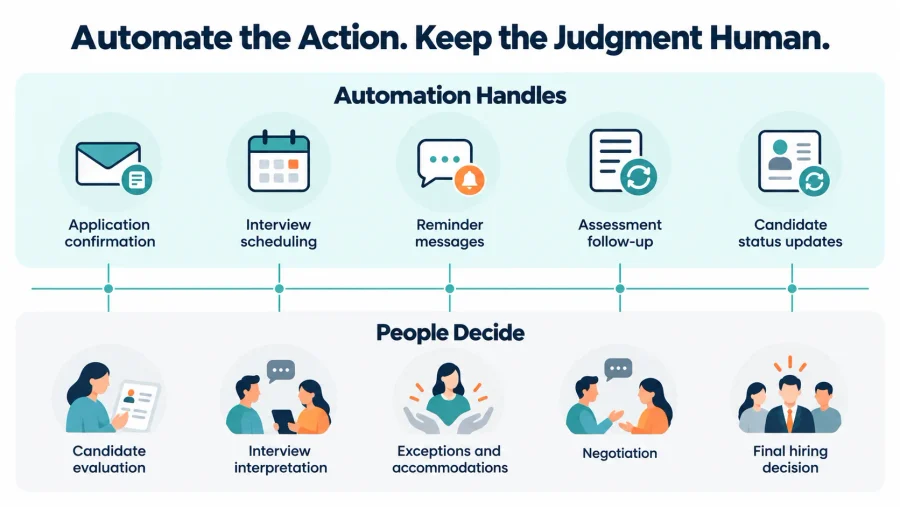
The distinction between those situations is at the center of effective recruitment automation best practices. Automation works best when software handles predictable administrative actions while recruiters and hiring managers remain responsible for decisions that require judgment, interpretation, empathy, or exceptions.
The objective is not to automate the largest possible number of recruiting tasks. A better goal is to design a hiring process where administrative work happens consistently in the background and people have more time to focus on candidates and decisions that genuinely need their attention.
Recruitment Automation Starts With a Defined Hiring Process
Recruitment automation is the use of predefined rules to trigger or complete recurring activities throughout the hiring process. Those activities can include application confirmations, assessment invitations, candidate reminders, interview scheduling, status changes, reference requests, internal notifications, offer generation, and other repeatable steps. The important part is that the rule should already make sense before it becomes automated.
For example, if every candidate who completes a required assessment should move into an Assessment Review stage, the system can perform that status change consistently. The recruiter still reviews the assessment and decides whether the candidate advances, but the administrative transition does not need to wait for manual intervention.
This is why a connected recruiting workflow should usually come before advanced automation. A workflow defines what each candidate stage means, what information should exist there, who owns the next action, and what conditions should move someone forward. Once those decisions are clear, automation can support them instead of trying to compensate for an undefined process.
Automation becomes risky when teams automate inconsistency. If one recruiter sends an assessment immediately, another waits three days, and nobody agrees on how many reminders candidates should receive, automating the current behavior does not solve the problem. It simply allows the inconsistency to happen faster and at greater scale.
Before configuring any automation, teams should therefore be able to explain what triggers the action, what should happen next, who owns any decision that follows, when the automation should stop, and what should happen if the candidate does something unexpected.
Automate Predictable Actions Before Consequential Decisions

The easiest place to begin is with tasks where the same event should reliably produce the same administrative response. A completed application can trigger a confirmation. A scheduled interview can trigger a reminder. A completed assessment can update a status and notify the recruiter. A candidate who has not finished a required task can receive a follow-up after a defined period.
Those actions save time because the recruiter is not adding meaningful judgment by clicking the button manually. Candidate decisions deserve more caution. Moving someone from Assessment Completed to Assessment Review is an administrative action. Automatically rejecting that person because a system generated one score is a hiring decision. The difference matters because the second action determines an employment opportunity based on information that may require context, validation, exceptions, or accommodation.
The U.S. Equal Employment Opportunity Commission has specifically warned that employers remain responsible for how automated tools affect applicants and employees. Its guidance on AI, algorithms, and employment decisions notes that automated tools can create discrimination risks, including situations in which people with disabilities are screened out by the way a tool evaluates them rather than by their actual ability to perform the job.
A recent SHRM discussion of overreliance on algorithmic hiring makes a similar operational point: automation can support high-volume recruiting, but excessive dependence on automated judgments can reduce recruiters’ ability to interpret results and consider context.
A useful distinction is therefore not simply whether a task can technically be automated, but whether the organization would be comfortable letting the same rule operate repeatedly without someone interpreting each case.
| Recruiting activity | Automation fit | Why |
|---|---|---|
| Application confirmation | High | Predictable action with little judgment required |
| Interview reminder | High | Same event should produce the same reminder |
| Assessment invitation | High | Can follow a defined candidate stage |
| Status movement after task completion | High | Administrative progression can be rule-based |
| Reference request | High | Usually follows a clearly defined stage |
| Final candidate selection | Low | Requires comparison, context, and accountability |
| Complex assessment interpretation | Low | Results may require human review |
| Negotiation | Low | Depends on candidate circumstances and business context |
| Sensitive candidate conversation | Low | Requires judgment and human communication |
The purpose of this framework is not to create a universal rule. A high-volume frontline hiring process may automate more operational steps than an executive search, while regulated or specialized positions may require more manual review.
Candidate Communication Should Be Timely Without Becoming Mechanical
Communication is one of the strongest opportunities for automation because candidate questions and delays often follow predictable patterns. Candidates want to know that their application arrived, when an interview is scheduled, what task comes next, and whether they need to take action. Automation can improve that experience when it removes unnecessary waiting.
A candidate who schedules an interview should not depend on a recruiter manually sending the confirmation. Someone who has not completed an assessment can receive a reminder without requiring the recruiting team to maintain a personal spreadsheet of unfinished tasks. The problem appears when every message is automated without considering how those messages fit together.
Candidates may receive repeated reminders after completing the required action, generic messages that do not match their actual stage, or communications written in a tone that feels disconnected from previous interactions. In those situations, automation reduces administrative effort while making the candidate experience worse.
Stopping conditions are therefore as important as triggers. If a candidate completes the assessment, the reminder sequence should stop. If the person moves to another status, messages associated with the old stage should no longer continue.
Discovered’s candidate sequences provide one way to manage structured outreach and follow-up, while conditional status rules can help teams connect candidate behavior to the appropriate next step. The broader principle is that communication automation should respond to the candidate’s current situation rather than simply follow a calendar.
Automation Becomes More Valuable When Candidate Actions Drive the Workflow
Some of the most useful recruiting workflows respond directly to what the candidate does. If a candidate submits required information, the next step can become available. If they complete an assessment, the recruiter can be notified. If they schedule an interview, the system can stop scheduling reminders and begin interview confirmations.
This is more useful than automation based only on time because the workflow stays connected to candidate activity. Discovered’s automated candidate stage movement illustrates this approach by allowing teams to define actions that move candidates through the workflow when specific requirements are completed.
The same concept extends to later hiring stages. For example, an approved candidate can receive an offer through a workflow status rather than requiring a recruiter to create and send the document separately. Discovered’s Offer Letter workflow allows an offer to be connected directly to a candidate status so that the document and candidate message are generated when the person reaches that point.
The important design principle is that automation should react to meaningful events in the hiring process, not simply fire actions because enough time has passed.
Build Exceptions Into the Workflow Before They Happen
Real candidates do not always follow the ideal process. Someone may need an accommodation. A candidate may complete a task through another channel. An interview may need to be rescheduled. A hiring manager may want additional review before someone advances. A candidate may respond directly to an automated message with a question that requires human help.
A workflow that works only when every candidate behaves exactly as expected is not a strong workflow. Teams should identify likely exceptions while designing automation and decide how those situations return to human review. That may mean allowing recruiters to override a status, pause a sequence, move someone backward, resend a task, or change the next step without breaking the rest of the candidate record.
Accessibility deserves particular attention when automated systems participate in screening or evaluation. The EEOC’s guidance on software, algorithms, and disability emphasizes the need for employers to consider reasonable accommodations when technology may prevent an applicant with a disability from being assessed accurately.
The goal is not to predict every unusual situation. It is to make sure the workflow has a clear path back to human judgment when the predefined rule no longer fits.
Structured Evaluation Makes Automation More Reliable
Automation becomes more useful when the information entering the workflow is consistent. If one interviewer evaluates candidates primarily on experience, another focuses on communication, and a third relies on general instinct, automating what happens after those interviews does not solve the underlying inconsistency.
Structured evaluation helps create more reliable inputs. Before interviews or assessments begin, teams should define the capabilities that matter for the role and determine how those capabilities will be reviewed. A Custom Skill Test can provide job-specific evidence for skills that are difficult to verify from a resume, while structured interview criteria can help hiring teams compare candidates using the same expectations.
The important point is not that every evaluation should produce a number that automatically determines the outcome. Structured information gives reviewers a clearer basis for judgment and gives automation more reliable signals for administrative actions such as routing the candidate to the correct reviewer or identifying that a required step is complete.
The stronger the evaluation process is before automation, the less likely the technology is to magnify inconsistent decision-making.
Test the Entire Candidate Experience Before Scaling Automation

A workflow can be technically correct and still create a poor experience. A confirmation may contain the wrong scheduling link. A reminder may arrive in the wrong time zone. A personalization token may display incorrectly. A sequence may continue after the candidate has already responded.
For that reason, automation should be tested from the candidate’s perspective before it is used broadly. Teams should move a test candidate through the entire journey exactly as a real applicant would experience it. That means checking application confirmations, assessment invitations, links, scheduling, reminders, status changes, offer steps, internal notifications, and any conditions that are supposed to stop future messages.
Testing should also include at least one path where the candidate does not behave as expected. If a task is skipped, an interview is rescheduled, or a candidate needs manual review, recruiters should know how the workflow responds.
This is particularly important when several automations interact. A status change may start one sequence and stop another, while simultaneously notifying a recruiter or triggering an assessment. Testing each automation individually may not reveal what happens when they operate together.
Measure Whether Automation Is Removing Work or Creating New Work
Successful recruitment automation should improve something measurable. Time to first candidate contact, time spent in each stage, assessment completion, interview scheduling speed, interview attendance, response rate, candidate drop-off, reference completion, time to hire, and recruiter administrative time can all provide useful signals.
The most useful metric depends on the automation being evaluated. An interview reminder should probably be judged partly by attendance and rescheduling behavior, while a status automation may be better evaluated by stage delays and recruiter workload.
Qualitative signals matter as well. Recruiters frequently overriding the workflow may indicate that the rule does not match reality. Candidates responding with confusion may indicate that communication is arriving at the wrong time. A growing backlog in one stage may mean that automation is moving candidates faster than the hiring team can actually review them.
A useful review can combine both sides:
| What you observe | What it may mean |
|---|---|
| Candidates wait less between predictable stages | Automation is reducing administrative delay |
| Recruiters repeatedly override a status rule | Workflow logic may be too rigid |
| Reminder completion rises | Timing or messaging is helping |
| Candidates receive irrelevant messages | Stopping conditions need review |
| One stage develops a backlog | Automation may be moving work faster than humans can process it |
| Administrative time falls without higher drop-off | Workflow is likely creating real efficiency |
The objective is not simply to prove that an automation ran successfully. It is to determine whether the hiring process became easier for candidates and more manageable for the team.
Recruitment Automation Needs Regular Maintenance
Hiring workflows change even when the software configuration does not. Job requirements evolve, interview teams change, assessment strategies are updated, candidate communication gets revised, and new hiring stages are introduced. A workflow that was correct when it was created can remain technically functional while gradually becoming disconnected from the actual recruiting process.
Teams should therefore review automations periodically and after meaningful process changes. That review should include triggers, message templates, timing, candidate links, stopping conditions, owners, exceptions, and the outcomes the automation was supposed to improve. High-volume workflows may need more frequent review because small problems can affect larger numbers of candidates quickly.
The same principle applies to later stages of hiring. Discovered’s Offer Letters use templates and workflow automation to reduce repetitive document handling, but those templates and rules still need to reflect current compensation, roles, countersigners, and hiring policies.
Automation increases consistency, which is valuable when the process is correct. If the process becomes outdated, that same consistency allows the wrong action to repeat just as reliably.
Better Recruitment Automation Creates Space for Better Recruiting
The strongest recruiting automation is often almost invisible to candidates. Confirmations arrive when expected. Scheduling does not require several emails. Completed tasks move into the right stage. Recruiters receive the information they need. Reminders stop when candidates respond, and unusual situations still have a clear path to human help.
None of those improvements replaces recruiting judgment. They protect it. A well-designed automated workflow removes the administrative work surrounding candidate decisions so recruiters and hiring managers can spend more time evaluating evidence, having meaningful conversations, answering questions, and deciding who should move forward.
That is the most useful way to think about recruitment automation best practices. The question is not how many recruiter actions software can eliminate. The better question is which actions can happen predictably in the background so that people can spend more of their attention where context genuinely matters.
When automation is built around a clear hiring process, tested against real candidate behavior, measured for actual improvement, and reviewed as the process changes, faster hiring becomes a consequence of better operations rather than the only objective.
Frequently Asked Questions
What is recruitment automation?
Recruitment automation uses software and predefined rules to complete or trigger repetitive hiring activities such as confirmations, reminders, scheduling, status movement, assessment invitations, reference requests, and offer-related steps.
What recruiting tasks are best suited to automation?
Tasks that are repetitive, predictable, rules-based, and performed frequently are usually strong candidates. Application confirmations, interview reminders, assessment follow-up, candidate status updates after completed tasks, and reference requests are common examples.
What recruiting decisions should remain human?
Final hiring decisions, complex candidate evaluation, sensitive conversations, negotiation, accommodations, and unusual candidate circumstances generally require human context and accountability. The EEOC’s guidance on automated employment technologies also makes clear that employers remain responsible for avoiding discriminatory outcomes when software influences employment decisions.
How can recruitment automation improve candidate experience?
Automation can reduce unnecessary waiting and provide faster, more consistent communication. It works best when messages remain relevant to the candidate’s current stage, unnecessary reminders stop after action is taken, and candidates still have access to a person when they need help.
How do you keep recruitment automation from feeling robotic?
Use conversational templates, relevant personalization, reasonable message frequency, clear stopping conditions, and human follow-up for questions or exceptions. Automation should support candidate communication rather than replace every interaction.
How often should recruitment automations be reviewed?
There is no universal schedule, but workflows should be reviewed periodically and whenever job requirements, hiring stages, assessment methods, communication templates, or recruiting technology changes. High-volume processes may benefit from more frequent checks because errors can affect more candidates quickly.
Does recruitment automation replace recruiters?
No. The strongest use cases remove repetitive administration around recruiting work. Recruiters and hiring managers remain responsible for evaluating candidates, handling exceptions, maintaining relationships, and making consequential hiring decisions.
Content