



Your hiring team has completed the interviews, reviewed the feedback, agreed on compensation, and selected the candidate. The most difficult hiring decision is already finished, yet the process can still slow down before the candidate becomes a new hire.
Someone needs to locate the right offer letter template, replace candidate information, confirm the compensation and start date, send the document, monitor the response, collect a signature, request a countersignature if needed, save the completed version, and update the candidate record. None of those tasks is especially complicated, but together they create a surprising amount of administrative work.
The problem becomes more noticeable when the same process is repeated across several recruiters, jobs, locations, or hiring managers. A step that takes only a few minutes for one candidate can become a recurring bottleneck when offers are being prepared every week.
Offer letter automation reduces that administrative burden by connecting reusable templates, candidate information, workflow triggers, electronic signatures, status tracking, and document management. The hiring decision still belongs to people; automation simply makes sure that once the team is ready to move forward, paperwork does not unnecessarily slow the process.
Offer Letter Automation Begins After the Hiring Decision

A strong automated offer process should not decide who receives an offer. That decision should already be complete before the automation begins.
This distinction matters because recruiting automation is most effective when it handles predictable actions rather than replacing decisions that require context and judgment. Our guide to recruitment automation best practices makes the same distinction: actions such as status updates, communications, document generation, and reminders are usually easier to automate safely than candidate selection or negotiation.
In the offer stage, the predictable work begins once an approved candidate reaches a defined point in the workflow. At that moment, the system can generate the correct document, populate candidate-specific information, send the appropriate link, collect signatures, and keep the offer status visible without asking a recruiter to recreate the same sequence manually.
That structure also creates a clearer boundary between what should remain human and what software can handle consistently.
| Human decision or interaction | Administrative step that can be automated |
|---|---|
| Decide which candidate receives the offer | Generate the approved offer document |
| Confirm compensation and terms | Insert candidate-specific fields |
| Discuss questions or negotiate | Deliver the offer and signing link |
| Handle exceptions | Track pending, signed, declined, or expired status |
| Maintain candidate relationship | Trigger reminders or next workflow steps |
The purpose of automation is therefore not to make offers impersonal. It is to prevent repetitive administration from competing with the conversations that matter most at the end of the hiring process.
Standardized Templates Reduce Rework Without Making Every Offer Identical
One of the most common sources of offer-stage friction is document preparation. When recruiters repeatedly copy an old offer letter, rename the file, replace candidate details, and manually adjust terms, small errors become easier to introduce.
Reusable templates reduce that repetition by establishing a consistent starting point. In Discovered, Offer Letter Templates can include standard language, signature settings, expiration rules, and tokens for information that changes from one candidate to another, such as compensation, job title, company name, start date, or countersigner.
The value of a template is not that every candidate receives an identical document. It is that the stable portions of the offer remain consistent while the information that genuinely changes can be updated deliberately.
This approach is particularly useful for organizations with recurring roles or multiple offer types. A company might maintain different templates for hourly employees, salaried positions, management roles, or other hiring situations while still customizing candidate-specific details before the document is sent.
Standardization also makes review easier. Instead of checking every offer as if it were a completely new document, HR and legal teams can focus on the fields and terms that vary.
That distinction is important because an employment offer still needs to reflect the actual position. SHRM’s guidance on offer letters emphasizes that employers should clearly communicate essential employment terms and customize templates when the position or employee requires different conditions. A reusable template should therefore reduce repetitive writing without becoming an excuse to send documents that no longer match the job.
The Offer Should Be Connected to the Hiring Workflow
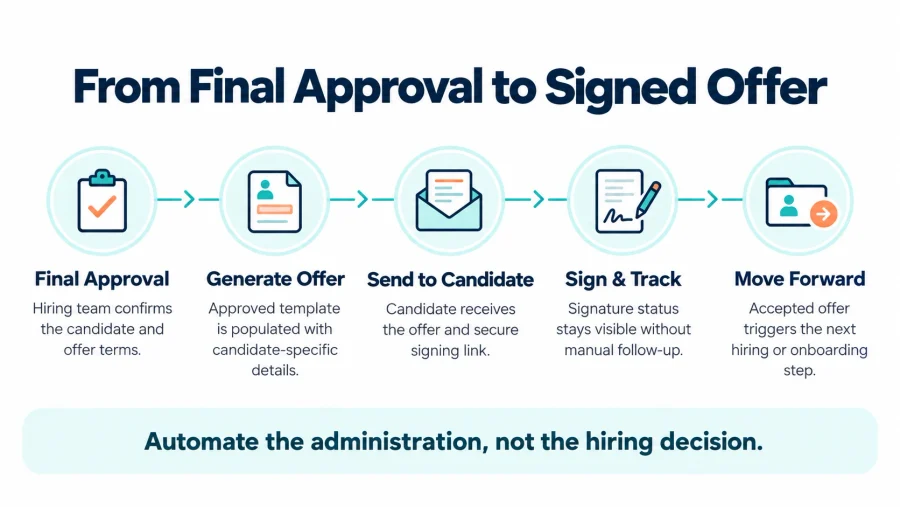
Templates solve document consistency, but they do not solve timing on their own. If recruiters still have to remember when to create the offer, where to send it, and how to update the candidate afterward, much of the administrative process remains manual.
This is where workflow-based automation becomes more valuable. In Discovered, an offer letter can be attached to a candidate status so that the document is generated when the person reaches that stage. The guide to adding an Offer Letter to a Job Workflow explains how teams can connect the automation to a status such as Offer Sent and include the offer link in the candidate message.
That structure creates a repeatable transition between final approval and candidate action. Instead of relying on someone to remember a series of disconnected tasks, the workflow defines what should happen once the candidate reaches the approved offer stage.
The same principle applies to the broader recruiting process. A well-designed recruiting workflow is easier to automate because the team has already defined what each stage means and what should happen next.
Offer automation works best when that logic is clear before software is introduced. The team should know which status triggers the offer, which template applies, who owns candidate communication, whether a countersignature is needed, what happens if the offer expires, and what stage follows acceptance. Without those decisions, automation simply makes an unclear process happen faster.
Speed Matters Most When the Candidate Is Already Ready to Decide
The offer stage is different from the beginning of the recruiting funnel because the employer and candidate have already invested substantial time in one another. The candidate has likely completed screening, interviews, assessments, and multiple conversations. The employer has spent time evaluating qualifications, gathering feedback, comparing finalists, and approving terms. Delays at this point are particularly frustrating because the decision is already close to complete.
A strong offer process can reduce the gap between final approval and written confirmation. Once the team is ready, generating and delivering the offer should not depend on finding the latest document version or waiting for someone to manually prepare an email.
Speed alone does not guarantee acceptance, but delays can create unnecessary uncertainty. Our guide to improving job offer acceptance rate explains that acceptance depends on the entire candidate experience, including transparency, communication, expectations, and how quickly the hiring team moves once a finalist has been selected.
SHRM’s guidance on closing candidates similarly stresses transparency and ongoing communication throughout the process so that the final offer does not introduce unexpected terms.
The written offer should confirm conversations the candidate has already had, not become the first place where critical information appears.
Electronic Signatures Make the Final Step Easier to Complete

Sending an offer quickly solves only part of the problem. The candidate also needs a simple way to review and accept it. Traditional workflows may involve downloading a document, printing it, signing it, scanning or photographing it, and emailing it back. That creates several opportunities for delay, especially when candidates are completing the process from a phone or outside normal business hours.
Discovered’s Offer Letters for Employers allow candidates to open the offer through a browser link and sign electronically without requiring a separate application or account. The completed offer remains connected to the candidate record so the hiring team can see its status without searching through email threads.
The value of electronic signatures is not simply convenience. They reduce the number of steps between candidate intent and a completed offer. That becomes especially useful when companies hire across different locations or when candidates are not sitting at a computer during business hours. A process that can be completed securely from a browser gives candidates fewer logistical obstacles at the moment when the organization wants them to commit.
Countersignatures and Expiration Rules Need Clear Ownership
Some organizations consider the candidate’s signature enough to complete the offer. Others require a hiring manager, HR leader, executive, or another company representative to countersign the document. Neither approach is inherently better; what matters is that the process is defined.
In Discovered, countersignature can be configured as part of the offer template, and the assigned user can complete their portion of the process after the candidate signs. The Offer Letters workflow documentation also allows teams to configure expiration windows when candidates need to respond within a defined period.
These settings become useful only when ownership is clear. If an offer requires a countersignature but the assigned person does not know they are responsible, automation can move the document into a waiting state without actually accelerating the process. Expiration works the same way. A deadline can create useful clarity, but it should reflect a deliberate recruiting policy rather than an arbitrary system setting.
Recruiters should understand how much time candidates normally need, what happens when an expiration date is approaching, whether extensions are permitted, and who decides when an expired offer should be reactivated or replaced. Automation can enforce those rules consistently once the organization has decided what the rules should be.
Offer Status Should Be Visible Without Searching Through Email
One of the less obvious benefits of offer letter automation is visibility. In a manual process, different pieces of information may live in different places. The original offer is in a shared folder, the email is in a recruiter’s inbox, the candidate’s signed version is attached to another thread, and the hiring manager asks for an update because they cannot see whether anything has happened.
That fragmentation makes simple questions harder than they should be. Teams should be able to determine whether an offer is waiting for the candidate, already signed, awaiting a countersignature, expired, declined, or revoked without reconstructing the history manually.
Discovered’s Managing Candidate Offer Letters guide shows how offer activity stays connected to the candidate profile, including the current status, document access, signature activity, and actions such as revoking an offer.
Centralizing that information improves more than convenience. It gives recruiters, managers, and administrators a shared view of the final stage instead of forcing each person to maintain their own version of what happened.
| Offer status | What the team needs to know |
|---|---|
| Pending | Candidate still needs to review or sign |
| Signed | Candidate has completed their signature |
| Awaiting countersignature | Internal action is still required |
| Expired | Response window ended without completion |
| Declined | Candidate did not accept the offer |
| Revoked | Employer withdrew the offer |
A consistent status model also makes reporting more useful because teams can distinguish different outcomes instead of treating every offer that did not become a hire as the same event.
Automation Should Support Candidate Communication, Not Replace It
The administrative side of an offer can be automated, but the candidate experience should not disappear into software at the moment when the employment relationship is becoming real.
Candidates may have questions about compensation, benefits, start dates, remote arrangements, schedule expectations, reporting structure, or other conditions. Some may want to negotiate. Others may simply need reassurance about what happens after they sign. Those conversations still belong to recruiters and hiring managers.
SHRM’s guidance on making confident job offers describes the offer as one of HR’s most important operational moments because it clarifies employment terms and helps set expectations before the candidate joins.
The best automated process therefore creates more space for human communication rather than reducing it. If recruiters spend less time editing documents, tracking signatures, and searching for files, they can spend more time answering questions and keeping finalists engaged.
This balance also reflects a broader rule of recruiting automation: repetitive administration is usually easier to automate than sensitive conversations. Technology can deliver the document and track the response, but people should remain available when the candidate needs context.
The Offer Stage Should Lead Directly Into What Happens Next
Signing an offer is an important milestone, but it is not the end of the employee journey. Once the offer is complete, the organization may need to begin onboarding, prepare payroll information, collect documentation, coordinate equipment, communicate a start date, or hand the new hire to another internal team.
That transition becomes easier when offer management is already connected to the candidate record rather than handled in an isolated tool. Discovered positions offer letters as part of its broader Onboarding and Employee Development workflow, which connects the final stages of recruiting with the operational work that begins after the hire is confirmed.
The same logic applies regardless of which systems an organization uses. Teams should define what acceptance triggers before the first offer is automated.
A signed offer might trigger an internal notification, a candidate status change, an onboarding handoff, or another defined process. The exact action will differ by company, but the transition should not depend on someone remembering to notice that the candidate signed.
Review the Process Before You Automate More of It
Offer letter automation becomes less effective when teams assume that once the workflow is configured, it no longer needs attention. Templates become outdated. Compensation structures change. Countersigners move into different roles. Legal language is revised. Hiring stages evolve, and candidate communication that once made sense may no longer match the current process.
Teams should periodically review the offer workflow from beginning to end. That includes checking whether templates still reflect the roles being hired, confirming that candidate-specific fields populate correctly, testing the signing experience, reviewing countersignature ownership, and making sure expired or revoked offers are handled consistently.
Legal language deserves particular care. Offer letters can create misunderstandings when employment terms are unclear or when old template language no longer reflects current policies. SHRM’s offer letter guidance recommends clearly communicating essential terms and reviewing templates so the document accurately reflects the employment arrangement.
Automation increases consistency, which is valuable when the underlying process is correct. The same consistency can become a liability when an outdated template or incorrect rule is allowed to repeat indefinitely.
A Better Offer Process Removes Administration From a Human Moment
The final stage of hiring should feel decisive rather than administrative. By the time a candidate reaches the offer, the organization has already invested in finding, evaluating, interviewing, and selecting that person. The remaining process should make it easy for the candidate to understand the offer, ask questions, sign when ready, and know what comes next.
Offer letter automation supports that experience by standardizing reusable documents, inserting candidate-specific information, connecting offers to hiring stages, simplifying signatures, maintaining status visibility, and reducing repetitive follow-up.
The value is not automation for its own sake. It is removing unnecessary work from a moment where speed, clarity, and candidate communication matter. When the administrative process runs predictably in the background, recruiters and hiring managers have more capacity to focus on the part of the offer stage that technology cannot replace: helping the candidate feel confident about saying yes.
Frequently Asked Questions
What is offer letter automation?
Offer letter automation uses templates, candidate information, workflow rules, electronic signatures, and status tracking to reduce the manual work involved in preparing, sending, signing, and managing employment offers.
Should an offer letter be sent automatically as soon as a candidate reaches the final stage?
Only when the organization has clearly defined what that status means and the hiring decision has already been approved. Automation should execute an established decision, not make the decision itself.
Can offer letters use reusable templates?
Yes. Discovered’s Offer Letter Templates allow employers to reuse standard content while inserting fields such as compensation, job title, company name, start date, and countersigner information for each offer.
Can candidates electronically sign their offer?
Yes. With Offer Letters in Discovered, candidates can access the document through a browser link and sign electronically without downloading, printing, or scanning the letter.
Do offer letters need a countersignature?
Not necessarily. Some organizations require a company representative to countersign, while others do not. In Discovered, countersignature requirements can be configured by template so the workflow matches the organization’s process.
What happens when an offer expires?
If an expiration window has been configured, the offer can move to an expired status once that period ends. The organization should have a defined policy for whether expired offers may be extended, reactivated, or replaced.
What should employers review before automating offer letters?
Teams should confirm the offer template, candidate-specific fields, approval process, sending trigger, candidate message, countersignature requirements, expiration policy, ownership, and next step after acceptance. The process should be tested before being used with live candidates.
Content