



A candidate finds your job opening, reads the description, researches the company, and decides the opportunity is worth pursuing. They click Apply expecting to take the next step, only to encounter account creation, a resume upload, several pages of required fields, the same employment history they already submitted, and questions that do not appear relevant to the role.The candidate may eventually finish, but some will simply leave. When that happens, the recruiting team never gets the opportunity to determine whether the person was qualified.
The job application is one of the first moments when candidate interest turns into actual participation in the hiring process. That makes application design more than an administrative concern. It influences candidate experience, application conversion, screening efficiency, and the quality of information recruiters receive.
Strong job application form best practices begin with a simple principle: the application should collect enough information to support the next hiring decision without asking candidates to complete work that can reasonably wait until later.
That balance matters because simplifying an application does not mean removing every useful question. The goal is to remove unnecessary friction while preserving the information the hiring team genuinely needs.
The Application Form Is a Conversion Point, Not Just a Data Collection Tool

Recruiters often think about application forms in terms of fields: name, email, employment history, availability, certifications, resume, and screening questions. Candidates experience something different. They experience the time required, the clarity of the instructions, how well the form works on their phone, whether they are being asked for the same information twice, and whether the questions seem appropriate for the job.
Those experiences can affect whether the candidate reaches the ATS at all. In its guidance on candidate-experience audits, SHRM describes the application stage as a critical conversion point and recommends streamlining applications, limiting upfront information requests, and avoiding redundant requests for information already contained in a resume.
The application also sits inside the broader candidate journey. As we discuss in our guide to the recruitment marketing funnel, employers can spend considerable effort generating job awareness and candidate interest before someone clicks Apply. If the form introduces unnecessary friction at that point, the organization can lose people after already investing in getting them there.
A good form therefore needs to satisfy two competing needs. Recruiters need enough information to determine what should happen next, while candidates should not be asked to complete work that provides little value at that stage.
Start With the Hiring Decision, Not With the Available Fields
Application design becomes unnecessarily complicated when teams begin by asking what information the system allows them to collect. A better starting point is to identify the decision the application needs to support.
For an entry-level customer service role, recruiters may need contact information, availability, location, work authorization where appropriate, a few job-related questions, and possibly a resume. A licensed healthcare position may require confirmation of specific credentials or state eligibility before anyone spends time scheduling an interview. A creative position may benefit more from a portfolio than several pages of detailed employment history. Those differences are why one universal application rarely works equally well for every job.
Discovered’s Customizable Application Forms are designed around that distinction, allowing teams to create simple one-page applications for straightforward roles or more detailed multi-step forms when additional documents, credentials, or role-specific information are genuinely required.
The most useful question during form design is therefore not whether a field could be added. It is whether the answer will influence the candidate’s next step.
| Type of role | Information that may matter early | Information that may be better later |
|---|---|---|
| Frontline / high-volume | Availability, location, basic eligibility | References, detailed employment verification |
| Licensed professional | License, certification, eligibility, relevant experience | Additional documentation not needed for initial screening |
| Creative | Portfolio, relevant work examples | Detailed background information unrelated to initial fit |
| Technical | Required tools or skills, relevant experience | Deeper technical evaluation better handled through an assessment |
| Management | Leadership experience, availability, relevant background | References and more detailed verification |
This approach also helps hiring teams decide when another tool is more appropriate than another application question. If recruiters need candidates to demonstrate a specific ability rather than simply state that they possess it, a Custom Skill Test may provide better evidence later in the workflow than adding several technical questions to the initial application.
Ask for What You Need Now, Not Everything You May Need Eventually
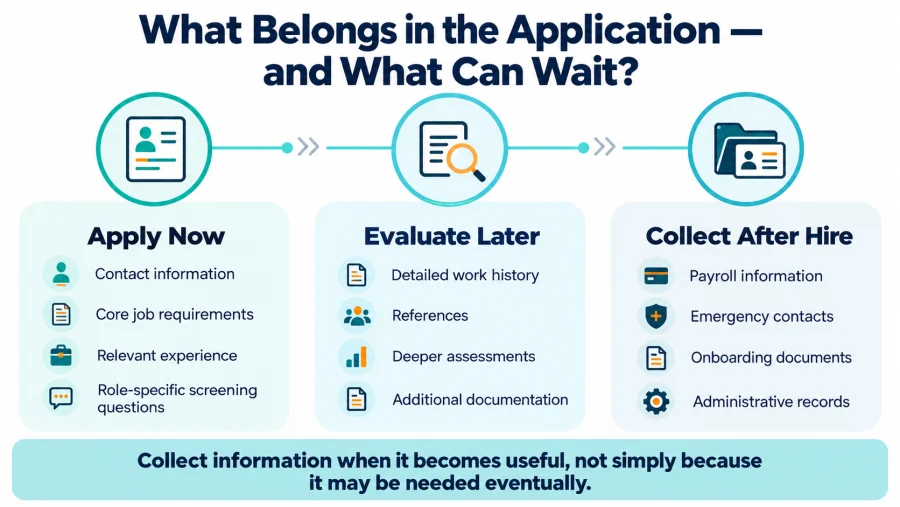
Hiring eventually requires a significant amount of information, but that does not mean all of it belongs in the first interaction. Reference details, employment verification, background-check information, onboarding documentation, payroll information, emergency contacts, and other administrative data may become necessary later. Asking for them before the organization has even decided whether to speak with the candidate increases effort without necessarily improving initial screening.
This is where application design can become bloated over time. A team adds one field because a hiring manager requested it, another because it may be useful someday, and several more because the system makes them available. Months later, candidates are completing a form filled with questions that few recruiters actively use.
The better approach is to periodically review every required field and determine whether the answer directly influences screening. If recruiters rarely look at a field or would make the same decision without it, that information may not belong in the initial application.
SHRM’s application guidance makes a similar recommendation by encouraging employers to reduce unnecessary questions and duplicate data entry rather than treating the initial application as the place to gather everything the organization might eventually need.
This distinction becomes especially useful when designing custom forms. Optional fields can provide candidates with an opportunity to share additional context without preventing submission, while required fields should be reserved for information the hiring team genuinely needs before moving forward.
Screening Questions Should Separate Requirements From Preferences
Screening questions are most useful when they help recruiters identify genuine job requirements quickly. If a position legally requires a particular license, asking whether the candidate holds it can save time for both the applicant and recruiter. The same may apply to essential schedule availability, work location, certification, or another non-negotiable requirement.
The problem begins when preferences are presented as absolute requirements. A company may prefer five years of experience but consistently hire strong candidates with four. A hiring manager may prefer previous experience in one specific industry but be open to transferable skills from another. Treating those preferences as automatic disqualifiers can remove candidates the organization would otherwise want to consider.
This is particularly important in high-volume hiring, where structured qualification questions can help teams prioritize large applicant pools, but poorly designed deal breakers can scale the wrong decision just as efficiently.
The application should therefore distinguish between qualifications that genuinely determine eligibility and information that helps recruiters evaluate relative fit.
A Simple Way to Classify Application Questions
| Question type | How it should be used |
|---|---|
| True requirement | Can determine whether the candidate is eligible to continue |
| Strong preference | Helps prioritize candidates but should not necessarily reject them |
| Useful context | Supports later evaluation but may remain optional |
| Future administrative need | Usually belongs later in the hiring or onboarding process |
| No clear hiring use | Consider removing it |
This classification is useful because it forces hiring teams to connect every question with an actual purpose rather than accumulating fields over time.
Avoid Duplicate Work Whenever Possible
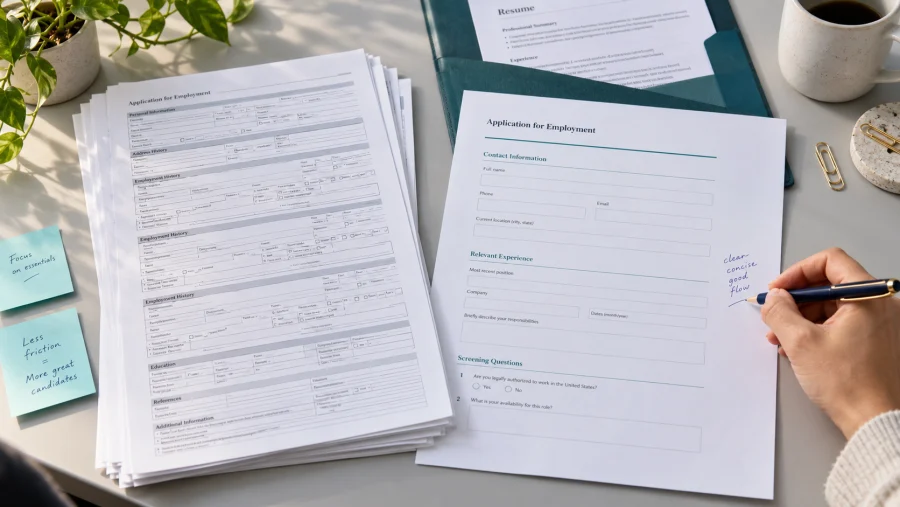
One of the easiest ways to make an application feel unnecessarily difficult is to ask a candidate to upload a resume and then manually reproduce all of the same information. Candidates recognize the duplication immediately. There are situations where structured information is genuinely required for reporting, integrations, compliance, or downstream workflows. The problem is not that duplicate information can never be requested; it is that duplication should have a reason.
If structured employment history is necessary, teams can limit the fields to information they actually use. If the resume already provides enough detail for initial screening, manually reconstructing every previous job may add more friction than value.
SHRM has specifically highlighted this issue, recommending that employers avoid requiring applicants to upload resumes and then re-enter the same information into separate fields.
This principle fits naturally with the broader recruiting workflow. Information should enter the process when it becomes useful, and once it has been collected, teams should avoid asking candidates to provide it repeatedly unless there is a legitimate operational need.
Mobile Experience Is Part of Application Design
Candidates do not always apply from a desktop computer. They may find an opening through a job-board notification during a break, receive a referral link by text, discover the company through social media, or start the process while using their phone.
An application that works well on a large monitor can become frustrating on a smaller screen if fields are difficult to navigate, document uploads fail, buttons are difficult to tap, or long sections require excessive scrolling.
SHRM has noted that employers should evaluate whether their application experience translates effectively to mobile devices and recommends monitoring abandonment to identify where applicants leave before submission.
Testing the application from a phone is therefore one of the simplest ways to discover friction. Recruiters should experience the same process candidates do, including opening the job from an external source, navigating to the application, uploading a resume, completing required fields, and submitting the form.
Longer applications can also benefit from structure. Discovered’s custom application forms support both one-page and multi-step experiences, allowing employers to divide more complex applications into logical sections rather than presenting every question at once.
Multi-step forms should not become an excuse to collect more information, however. A five-question application does not need four separate pages. The form structure should make necessary complexity easier to understand, not create complexity where none exists.
Keep Application Questions Job-Related
Application design also has legal and compliance implications in the United States. According to the EEOC’s guidance on pre-employment inquiries, information requested during the pre-employment process generally should be limited to what is essential for determining whether someone is qualified for the job. The agency also warns that questions revealing characteristics such as race, sex, national origin, age, religion, or disability can create concerns when they are unrelated to legitimate employment requirements.
The ADA adds additional restrictions before an offer. The EEOC’s guidance on medical questions and examinations explains that employers generally may not ask disability-related questions or require medical examinations before making a conditional employment offer.
Because requirements can vary by jurisdiction and role, organizations should have application questions reviewed appropriately when there is uncertainty. From a form-design perspective, the practical lesson is that questions should have a clear connection to the job and to the stage of the hiring process where they are being asked.
Keeping questions job-related improves more than compliance. It also makes the application easier for candidates to understand because the information they are being asked to provide has an obvious relationship to the opportunity.
Turn Application Data Into the Next Hiring Action
Collecting information does not create value by itself. The value comes from what the hiring team does with it. If a candidate confirms a required certification, that answer may support moving them to the next screening stage. If someone indicates that they cannot work the required schedule, the response may need recruiter review. If a candidate submits a portfolio, the hiring manager may need access to it before an interview is scheduled.
The application should therefore connect directly with the hiring workflow rather than function as an isolated digital form. This is also where thoughtful automation can reduce administrative work. Application confirmations, candidate routing, qualification flags, assessment invitations, recruiter notifications, and other predictable actions can often happen automatically once the required information exists.
Our guide to recruitment automation best practices explains why rules-based administrative work is generally better suited to automation than decisions requiring context or judgment.
For application forms, that means automation can help organize and act on candidate information without requiring the system to make every hiring decision. Recruiters should still review exceptions and consequential outcomes where human context matters.
Reuse Strong Forms Without Turning Every Role Into the Same Application
Once an organization creates an effective application, rebuilding it from memory every time a similar position opens creates unnecessary work and makes inconsistencies more likely.
Templates can provide a useful starting point for recurring job families, departments, locations, or franchise units. A company might maintain separate starting forms for frontline positions, managers, licensed professionals, and technical roles while still adapting each one when the job requires something different.
Discovered’s Customizable Application Forms can be saved and reused as templates, which makes standardization easier without requiring every opening to use one universal form.
This balance matters because standardization and customization solve different problems. Templates prevent teams from repeatedly rebuilding proven structures, while customization ensures that candidates are not answering questions that have nothing to do with the position they actually want.
Measure Where Candidates Leave, Not Just How Many Submit
Application completion is useful, but it should not be evaluated in isolation. A two-question form may generate a very high completion rate while giving recruiters almost no useful screening information. A 45-minute form may produce extensive data but discourage qualified candidates before the recruiting team ever sees them. The objective is to find the lowest amount of candidate effort that still supports a meaningful next decision.
Application-start rate, completion rate, abandonment, completion time, mobile performance, qualified-applicant rate, and downstream screening conversion can help reveal whether the form is achieving that balance.
SHRM recommends measuring candidate drop-off and evaluating the application experience directly before and after changes are made, rather than assuming that a shorter process automatically produces a better one.
The relationship between completion and applicant quality is particularly important. If shortening the application increases submissions but sharply reduces the percentage of candidates who meet core requirements, the form may have lost information that was genuinely useful. If removing several questions improves completion without changing qualified-applicant rates, those questions may never have been necessary.
Better Applications Create Better Hiring Inputs
A job application does not need to collect everything an employer may eventually need to know about a candidate. Its purpose is to collect the right information for the decision that comes next.
That means using required fields intentionally, asking screening questions about real requirements, eliminating unnecessary duplication, designing for mobile candidates, and moving administrative information to later stages when appropriate.
Technology can make those practices easier to maintain. Custom forms can adapt the candidate experience to different types of roles, templates can standardize proven structures, and automation can connect important responses with the next recruiting action.
The result should not simply be a shorter application. A better application gives candidates a clearer experience while giving recruiters cleaner, more relevant information to work with once the person enters the pipeline.
When those two outcomes happen together, reducing candidate drop-off and improving screening quality no longer have to be competing goals.
Frequently Asked Questions
How long should a job application form be?
There is no universal ideal length. The form should be as short as possible while still collecting the information needed to determine the candidate’s next appropriate step. Simple frontline roles may require only a small number of fields, while licensed or specialized positions may reasonably need more information.
What information should employers collect on an initial job application?
Contact details, relevant experience, availability, resume information, and role-specific qualifications are common starting points. Additional information should be collected when it supports a real hiring decision at that stage rather than simply because it may become useful later.
Should candidates upload a resume and enter their work history manually?
Employers should avoid unnecessary duplication whenever possible. SHRM specifically recommends reducing repeated requests for information already available on the candidate’s resume because redundant entry adds effort without necessarily improving the hiring decision.
Should every application use the same questions?
No. Different jobs require different information. Discovered’s Customizable Application Forms allow hiring teams to tailor application fields and layouts to the role while still reusing proven templates where requirements overlap. Discovered.ai
When should screening questions be deal breakers?
A deal breaker should generally represent a genuine requirement rather than a preference. Required licenses, essential availability, or another non-negotiable qualification may justify this treatment, while preferred experience levels or backgrounds often need more nuanced review.
How can employers reduce application abandonment?
Teams can reduce unnecessary required fields, avoid duplicate data entry, improve mobile usability, make complex forms easier to navigate, and test the complete candidate experience themselves. Monitoring where candidates leave can then show whether those changes actually improve completion.
Can employers ask medical questions on an application?
In the United States, the ADA generally limits disability-related questions and medical examinations before a conditional offer. Employers should consult the EEOC’s guidance on pre-employment medical inquiries and consider applicable state or local requirements when designing application questions.
Content