
Discovered Mobile App
Your Hiring Pipeline, in Your Pocket
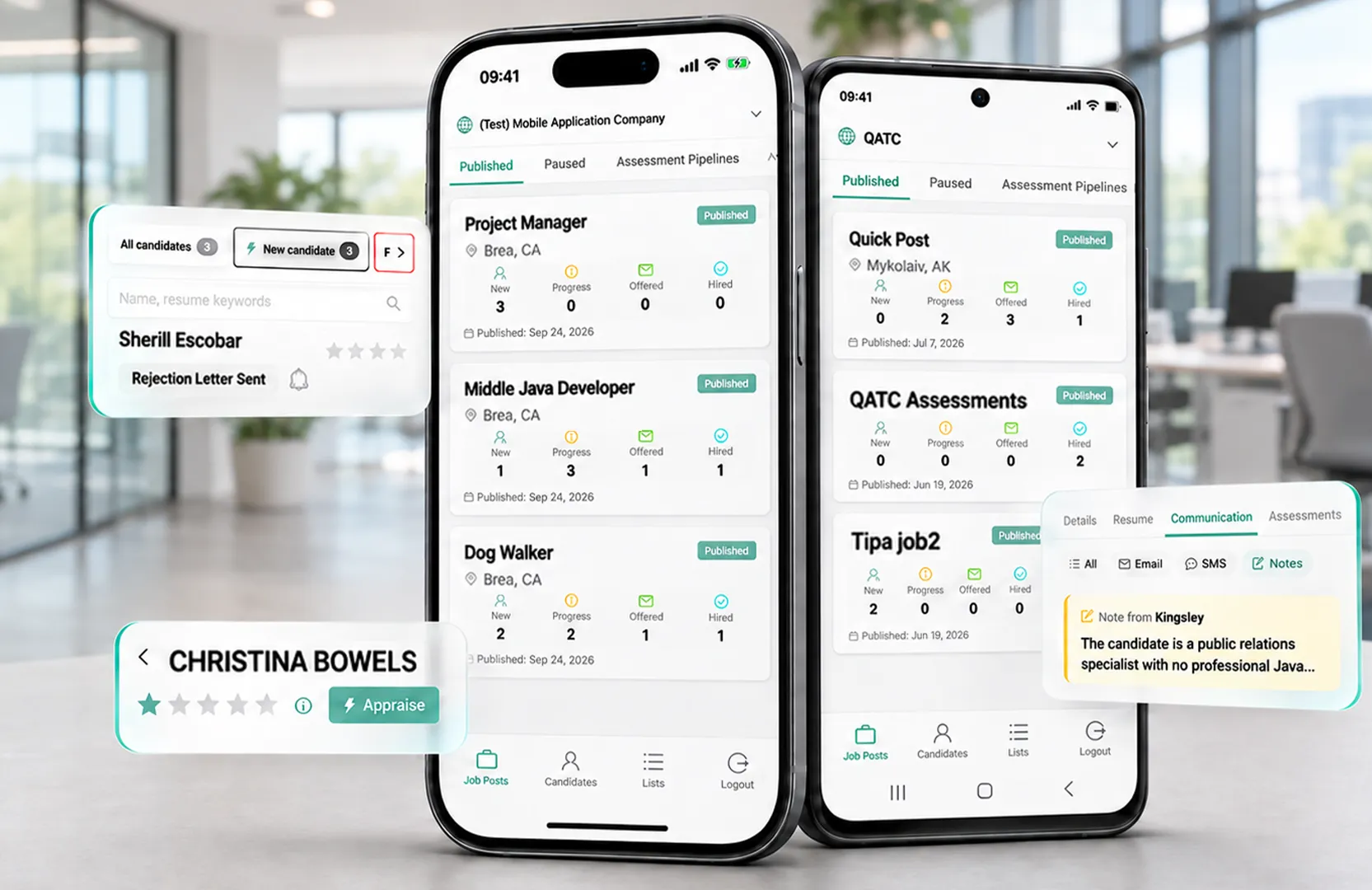
Review candidates, appraise with Kingsley AI, and follow up from your phone. The Discovered mobile app brings your performance hiring software with you between meetings, across locations, or on site. Available for iPhone and Android.

What Is the Discovered Mobile App?

Discovered mobile app brings performance hiring software to your iPhone or Android. Review candidates and assessments, appraise with Kingsley AI, and keep conversations and hiring workflows moving.
How to get started with the discovered mobile app

Download Discovered
Get the app from the App Store or Google Play. Free download for Discovered customers.

-
Use Your Existing Login
Sign in with your Discovered email and password, Google account, or Microsoft account.

-
Open Your Hiring Pipeline
Choose your company if you work across multiple accounts, then open a job and start reviewing candidates.


Learn more about our tools
Features Form - Category: Applicant Management & Workflow (DAI)
"*" indicates required fields
Your Workday Moves. Your Hiring Should Too.

Follow Up While You Have the Opportunity
Use a break between meetings or locations to review an application and reach out, instead of adding it to your end-of-day list.

Have the Full Picture Before You Respond
Read the resume, check assessment results, and review past conversations from the same candidate profile on your phone.

Keep Your Team Working From the Same Record
Your mobile updates appear in Discovered on the web, so teammates can see the latest status, notes, and messages.

Keep Candidate Reviews Consistent
Review candidates against the role’s criteria. For consistent interviews, follow OPM’s guidance on questions and rating standards.
Your Next Candidate Review Can Happen Here
Take Discovered with you and put the next few minutes to work for your hiring team.

The Candidate Details and Actions You Need on the Go

Review the Full Candidate Profile
Access resumes, candidate assessments, screening answers, interview videos, scorecards, reference checks, attachments, and communication history.

Bring Kingsley AI With You
Tap Appraise for Kingsley AI’s candidate rating. Add your own star rating and notes as you review.

Reach Out From the Profile
Use candidate communication tools to send a text or email, start a sequence, or send an assessment. Tap a candidate’s phone number to call.

Move Candidates to the Next Step
Change a candidate’s status from your phone. The status sequences configured in your hiring workflow run as they do on the web

Find Candidates Across Your Jobs
Search across jobs, sort by newest or rating, and filter by job post and rating to focus your review.

Bring Hiring Managers Into the Review
Create and share candidate lists. Recipients can review a shared list after a quick PIN check, without a Discovered account.
Learn more about our tools
Features Form - Category: Applicant Management & Workflow (DAI)
"*" indicates required fields
Connected to the Hiring Tools Your Team Already Uses
Discovered mobile app brings candidate reviews, assessments, AI insights, and communication to your phone. Set up workflows in Discovered on the web, then keep hiring moving on the go.
Candidate Tracking Within Your Hiring Process
Keep jobs and candidate information in one system. Use the app to review your pipeline while your team continues working in Discovered on the web.
Your Workflows, Still Moving
Configure hiring stages and automations on the web. When you change a candidate’s status in the app, the configured status sequences run as usual.
Your Team, Working From Context
Add notes with @mentions, rate candidates, and share candidate lists from your phone. Connect mobile reviews with your team’s broader hiring collaboration.
Built for Hiring Teams With Places to Be

Owners managing hiring across multiple locations.
-
Managers reviewing candidates between tasks on site.
-
Recruiters keeping candidates moving between meetings.


Don’t Let Great Candidates Wait
Download the Discovered mobile app to review the candidate, send the follow-up, and move hiring forward before you get back to your desk.
Frequently Asked Questions
No. The Discovered mobile app is a free download for Discovered customers and uses your existing account.