A construction applicant tracking system helps contractors manage applications, communication, and hiring reviews across projects. It is most useful when qualified people are already expressing interest but the team struggles to coordinate what happens next. Software can make that work more visible; it still needs clear responsibilities and a hiring process that reflects the role.
Imagine a concrete contractor preparing for another project. The office has applications for finishers, a superintendent has referred someone by text, and a project manager is waiting for interview feedback. Before adding more advertising, the owner needs to know whether those candidates have been reviewed and who is responsible for contacting them. That is a practical starting point for evaluating an ATS.
Where a Construction Applicant Tracking System Adds Value
An ATS is a shared record of applicants and hiring activity. It can organize candidate information, hiring stages, feedback, and communication, with capabilities varying by product and configuration. It serves a different purpose from a tool that assigns existing employees to projects or tracks hours worked.
Look for recurring coordination problems before choosing features. These situations give a vendor something concrete to demonstrate:
- A referral reaches the superintendent but never reaches the office’s review process.
- Two managers contact the same applicant without seeing each other’s conversation.
- A candidate waits for a decision because nobody knows whose review is outstanding.
The industry also faces constraints that better tracking cannot remove. The 2026 AGC and NCCER Workforce Survey found that 88% of firms with hourly craft openings considered those positions as hard or harder to fill than a year earlier. That finding describes hiring difficulty, not the effectiveness of an ATS. A contractor may need both a stronger recruiting strategy and a more dependable way to handle the interest it generates.
Our guide to applicant tracking systems for different industries explains why software evaluation should reflect the work an employer recruits for. In construction, that means examining the information the office collects and the decisions field supervisors need to make. A generic pipeline demonstration may not reveal whether the system supports either group well. If you run a general contractor, our page on hiring software for general contractors shows how the office, project managers, and superintendents can share one pipeline.
What Useful Screening Looks Like for Different Roles
For a concrete finisher, start with evidence of comparable work. Ask how the application captures relevant tasks, project experience, availability, and the practical requirements of the assignment. A resume may provide context, but a brief description of work performed can also help a qualified reviewer decide what to discuss next. The system should preserve that information where the reviewer can find it.
Follow the same candidate through the demonstration. Can the office identify missing information, ask a relevant question, and pass the response to the superintendent? Who checks a required credential or decides whether a practical evaluation is appropriate? Collecting an answer and confirming that it is sufficient are separate responsibilities.
For a project manager, focus on the interview review. Several people may need to examine experience, discuss project responsibilities, and contribute feedback. Ask the vendor to show how those reviewers see the same information and record their observations. The goal is a usable account of the evidence behind a decision rather than several unconnected impressions.
Interview structure deserves attention independently of the platform. In a 2022 meta-analysis of personnel selection methods, Sackett and colleagues found structured interviews were the highest-ranked selection procedure among those examined. That supports using relevant questions and evaluation criteria; it does not establish that an ATS produces a specific improvement in hiring quality. Software can store the feedback while the team remains responsible for its substance.
When the broader process is unclear, our construction recruitment guide provides context for connecting sourcing, screening, and selection. Define those steps before turning them into automated stages. Otherwise, the system may reproduce a process that employees already find confusing.
What Software Cannot Fix for Your Crew
A candidate profile can hold documents and evaluation notes where supported, but its existence does not verify a worker’s ability. Decide what evidence is required, who checks it, and when that review must happen. Apply the same care to a document uploaded by the candidate and a qualification entered by an employee.
An ATS also cannot correct a mismatch between the advertised position and the assignment someone receives. Travel expectations, work location, schedule, supervision, and training need to reflect the actual job. Clear pre-start communication can expose questions early, but operating conditions still require attention from the contractor.
AI features need equally specific evaluation. The AGC and Sage 2026 Construction Hiring and Business Outlook reported that 16% of respondents used AI for recruitment, training, or other HR functions. This broad category does not measure ATS adoption. Ask what a particular feature analyzes, what information supports its output, and how someone reviews it before acting.
Past applications require judgment as well. An earlier candidate may be relevant to a new project, but availability and qualifications can change. Our guide to hiring skilled trades without more job board spending discusses revisiting existing candidate relationships. Review the original context and applicable communication permissions before restarting contact.
Put the Platform Through a Real Hiring Test
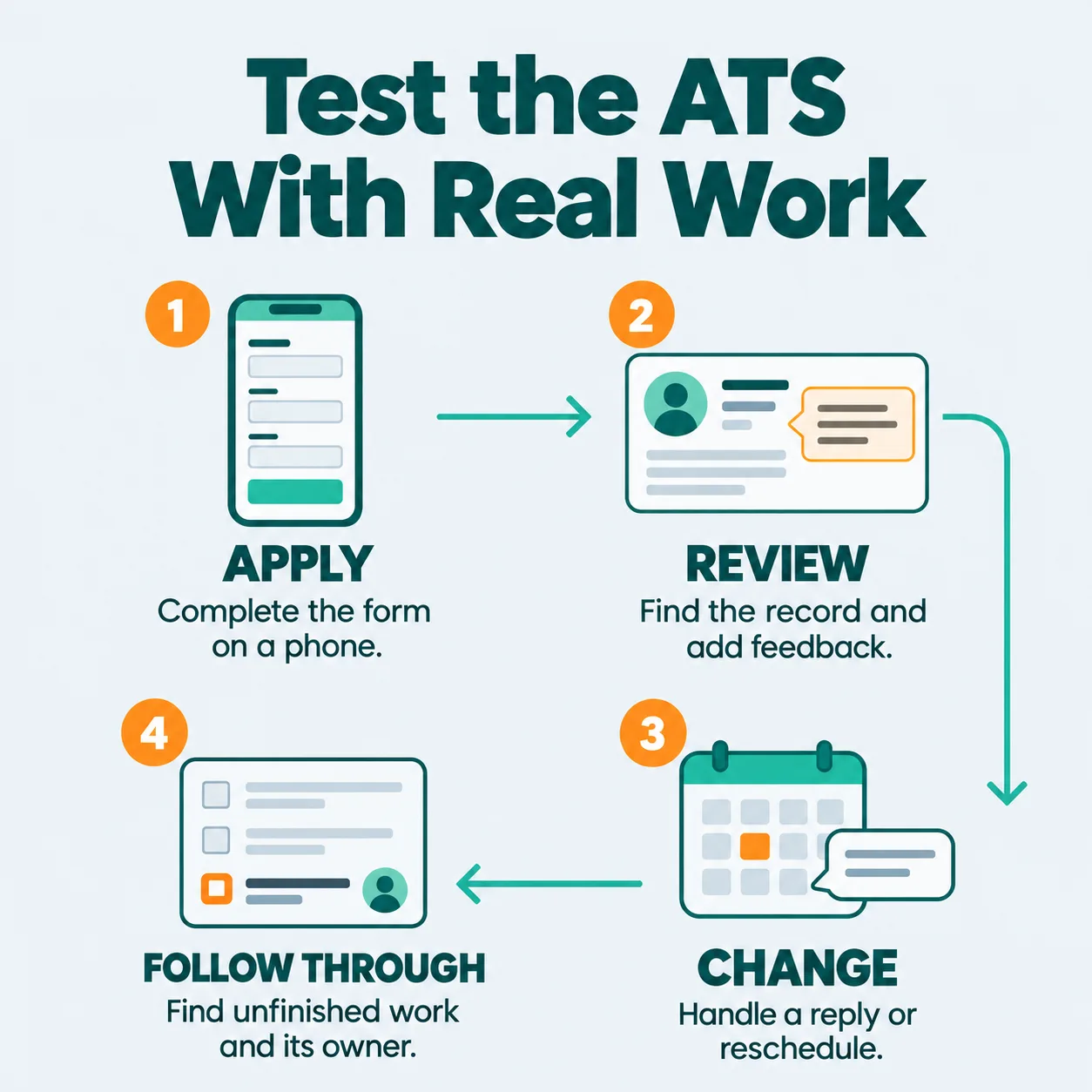
Choose a familiar opening and include both an office user and a field supervisor in the demonstration. Use realistic sample information without exposing applicant personal data. Ask the team to complete the work themselves rather than only watching a presenter move through prepared screens.
- Complete the application. Open it on an ordinary phone and check the required fields, instructions, and submission confirmation. Ask what supported assistance is available if a candidate cannot complete the normal route.
- Find and review the candidate. Have the office locate the application and pass relevant information to the supervisor. Check whether the supervisor can understand the record and enter useful feedback on the device they would actually use.
- Handle a reply and a change. Ask the vendor to demonstrate how a candidate’s question reaches a responsible person. Then change an appointment or complete a requested step and check how pending reminders are stopped or updated.
- Recover an unfinished task. Leave a manager review incomplete and return to the record. Confirm who can see the delay, who owns the next action, and how another person takes over if the original reviewer is unavailable.
The test should reveal configuration needs as well as useful features. A missed step may require a clearer internal rule, a product setting, or a capability the system does not offer. Record which explanation applies instead of assuming every problem will disappear after implementation.
Choose a Workflow Your Team Will Use
Discovered’s applicant tracking system supports candidate records, custom statuses, communication, and collaborative evaluation, with workflow automation connecting supported actions. Those capabilities can address the coordination problems described here. Confirm the configuration and scope you need during the demonstration, including any integration your team depends on.
Before committing, leave the conversation with answers your office and field team can use. A short checklist helps distinguish demonstrated behavior from follow-up questions:
- Which steps worked for the opening tested, and which still require confirmation?
- Who will configure the workflow and train each group of users?
- Which candidate or manager exceptions need manual attention?
- How will the team measure whether reviews and follow-up improve?
Begin with a manageable pilot and consistent definitions. For example, distinguish time to first meaningful contact from an automatic acknowledgment, and an interview completed from an invitation sent. Review outstanding manager evaluations alongside those measures so more applications do not conceal a growing backlog.
A construction applicant tracking system earns its place when the team can use it to complete recurring hiring work reliably. For contractors considering construction hiring software, the next step is to test that fit against a real role. Book a demo with Discovered and bring the hiring situation, required reviews, and unresolved handoffs your team needs to address.
Frequently Asked Questions
What is a construction applicant tracking system?
It is software for organizing applicants, communication, hiring stages, and evaluation records for contractor roles. Its usefulness depends on how well the configured process supports the people reviewing those candidates.
Does a small contractor need an ATS?
Consider the recurring workload and the difficulty of coordinating hiring across people or projects. Company size alone does not establish whether a system will be useful or which capabilities are necessary.
Can an ATS verify licenses or practical skills?
A system may collect documents and evaluation results, depending on its capabilities. The contractor still needs an appropriate verification process and qualified reviewers; storing a document is not proof of competence.
Is an ATS the same as construction workforce management software?
An ATS primarily supports recruiting and hiring applicants. Workforce tools may manage existing employees’ assignments, schedules, or time, so confirm the product scope and any required integration.
Content